Destacado en:Best AI Audio Tools
Destácate →🚀 Zaprep: Tus redes sociales al máximo. Empezar gratis — automatiza 1,000 DMs/mes y convierte el engagement en leads. con 1,000 DMs automatizados/mes.
Enviar tu herramienta
25,000+ herramientas de IA ya listadas
25K+Herramientas
400K+/moVistas
105K+/moVisitantes



✦
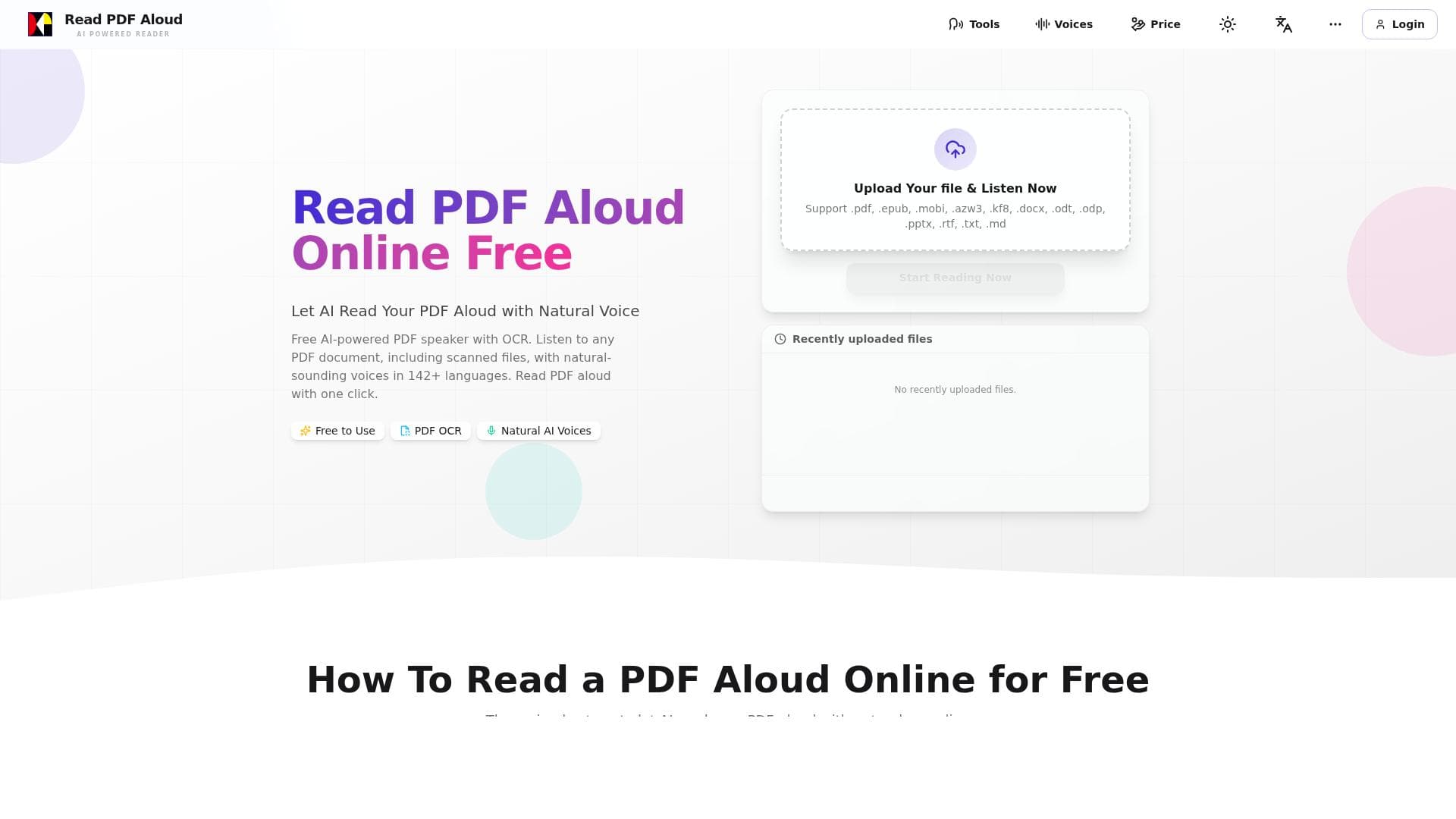
Read PDF Aloud is a free, web-based AI tool that converts any PDF, including scanned documents, into natural, human-like speech in over 142 languages. Perfect for students, professionals, and accessibility needs, it offers seamless, device-agnostic access to audible PDF content without any cost.

Descripción
Read PDF Aloud is a free, web-based tool that uses advanced AI to convert your PDFs into natural speech. It supports 142 languages and works on any device. It can convert any PDF, including scanned files via OCR, into natural speech with natural AI voices.
Descripción detallada
Read PDF Aloud is a powerful, free, web-based AI tool designed to convert PDF documents into natural, human-like speech. Its core purpose is to make PDF content accessible and easy to consume audibly, leveraging advanced AI-driven text-to-speech technology. Whether you have academic papers, business reports, eBooks, or scanned documents, Read PDF Aloud transforms these files into spoken words, enabling users to listen rather than read. This is especially beneficial for individuals with visual impairments, reading difficulties, or those who prefer auditory learning. The tool’s web-based nature means it requires no installation and is accessible from any device with an internet connection, including desktops, laptops, tablets, and smartphones, making it highly versatile and convenient. One of the standout features of Read PDF Aloud is its support for over 142 languages, making it a truly global solution for users worldwide. This extensive language support ensures that users can listen to PDFs in their native language or learn new languages through auditory exposure. Additionally, Read PDF Aloud can process scanned PDFs using Optical Character Recognition (OCR) technology, which extracts text from images within PDFs, enabling even non-editable or image-based documents to be converted into speech. The AI voices used are natural and expressive, avoiding the robotic tone often associated with text-to-speech tools, thus providing a pleasant listening experience. The tool’s interface is straightforward and user-friendly, allowing users to upload their PDF files and start listening within seconds. Read PDF Aloud is ideal for a wide range of users. Students can benefit from listening to textbooks and research papers while multitasking or resting their eyes. Professionals can listen to lengthy reports or presentations during commutes or while exercising. People with dyslexia or other reading challenges can access written content more easily. Additionally, language learners can improve their pronunciation and comprehension by listening to documents in different languages. The tool’s ability to work on any device means users are not restricted to a particular platform or operating system, enhancing its accessibility and convenience. The tool is completely free to use, with no subscription or payment required, making it an excellent choice for budget-conscious users or those seeking a reliable text-to-speech solution without financial commitment. Unlike many paid alternatives, Read PDF Aloud offers robust features such as OCR and extensive language support at no cost, which is a significant advantage. Users simply visit the website, upload their PDF, and start listening immediately. Compared to other text-to-speech tools, Read PDF Aloud stands out due to its combination of free access, broad language coverage, and OCR capabilities. Many competitors either limit language options, require paid plans for OCR, or do not support scanned documents effectively. While some premium tools may offer more customizable voice options or integration capabilities, Read PDF Aloud’s simplicity and accessibility make it an excellent choice for everyday users and those new to text-to-speech technology. However, there are some considerations to keep in mind. As a free, web-based tool, Read PDF Aloud depends on a stable internet connection and may have limitations in processing extremely large or complex PDF files. The voice customization options are limited compared to some premium services, which might be a drawback for users seeking highly personalized voice profiles. Additionally, since it is browser-based, privacy-conscious users should be aware that their documents are uploaded to the service for processing, so sensitive information should be handled with caution. Despite these minor limitations, Read PDF Aloud offers a compelling, accessible solution for converting PDFs into natural speech efficiently and effectively.
Características de la herramienta
- Converts any PDF into natural speech
- Supports scanned files via OCR
- Supports 142+ languages
- Works on any device
- Uses natural AI voices
Descripción
✦
Read PDF Aloud is a free, web-based AI tool that converts any PDF, including scanned documents, into natural, human-like speech in over 142 languages. Perfect for students, professionals, and accessibility needs, it offers seamless, device-agnostic access to audible PDF content without any cost.
Read PDF Aloud is a free, web-based tool that uses advanced AI to convert your PDFs into natural speech. It supports 142 languages and works on any device. It can convert any PDF, including scanned files via OCR, into natural speech with natural AI voices.
Descripción detallada
Read PDF Aloud is a powerful, free, web-based AI tool designed to convert PDF documents into natural, human-like speech. Its core purpose is to make PDF content accessible and easy to consume audibly, leveraging advanced AI-driven text-to-speech technology. Whether you have academic papers, business reports, eBooks, or scanned documents, Read PDF Aloud transforms these files into spoken words, enabling users to listen rather than read. This is especially beneficial for individuals with visual impairments, reading difficulties, or those who prefer auditory learning. The tool’s web-based nature means it requires no installation and is accessible from any device with an internet connection, including desktops, laptops, tablets, and smartphones, making it highly versatile and convenient. One of the standout features of Read PDF Aloud is its support for over 142 languages, making it a truly global solution for users worldwide. This extensive language support ensures that users can listen to PDFs in their native language or learn new languages through auditory exposure. Additionally, Read PDF Aloud can process scanned PDFs using Optical Character Recognition (OCR) technology, which extracts text from images within PDFs, enabling even non-editable or image-based documents to be converted into speech. The AI voices used are natural and expressive, avoiding the robotic tone often associated with text-to-speech tools, thus providing a pleasant listening experience. The tool’s interface is straightforward and user-friendly, allowing users to upload their PDF files and start listening within seconds. Read PDF Aloud is ideal for a wide range of users. Students can benefit from listening to textbooks and research papers while multitasking or resting their eyes. Professionals can listen to lengthy reports or presentations during commutes or while exercising. People with dyslexia or other reading challenges can access written content more easily. Additionally, language learners can improve their pronunciation and comprehension by listening to documents in different languages. The tool’s ability to work on any device means users are not restricted to a particular platform or operating system, enhancing its accessibility and convenience. The tool is completely free to use, with no subscription or payment required, making it an excellent choice for budget-conscious users or those seeking a reliable text-to-speech solution without financial commitment. Unlike many paid alternatives, Read PDF Aloud offers robust features such as OCR and extensive language support at no cost, which is a significant advantage. Users simply visit the website, upload their PDF, and start listening immediately. Compared to other text-to-speech tools, Read PDF Aloud stands out due to its combination of free access, broad language coverage, and OCR capabilities. Many competitors either limit language options, require paid plans for OCR, or do not support scanned documents effectively. While some premium tools may offer more customizable voice options or integration capabilities, Read PDF Aloud’s simplicity and accessibility make it an excellent choice for everyday users and those new to text-to-speech technology. However, there are some considerations to keep in mind. As a free, web-based tool, Read PDF Aloud depends on a stable internet connection and may have limitations in processing extremely large or complex PDF files. The voice customization options are limited compared to some premium services, which might be a drawback for users seeking highly personalized voice profiles. Additionally, since it is browser-based, privacy-conscious users should be aware that their documents are uploaded to the service for processing, so sensitive information should be handled with caution. Despite these minor limitations, Read PDF Aloud offers a compelling, accessible solution for converting PDFs into natural speech efficiently and effectively.
Preguntas frecuentes
What is Read PDF Aloud?
Read PDF Aloud is a free, web-based AI tool that converts PDF documents into natural speech, supporting over 142 languages and including OCR capabilities to handle scanned files.
How much does Read PDF Aloud cost?
Read PDF Aloud is completely free to use with no subscription or payment required.
Who is Read PDF Aloud best for?
It is ideal for students, professionals, people with visual impairments or reading difficulties, and language learners who want to listen to PDF content on any device.
What are the main features of Read PDF Aloud?
Key features include converting any PDF into natural speech, OCR support for scanned files, support for 142+ languages, compatibility with all devices, and use of natural AI voices.
Does Read PDF Aloud offer a free trial?
Since Read PDF Aloud is entirely free, there is no need for a trial period.
What integrations does Read PDF Aloud support?
Read PDF Aloud is a standalone web-based tool and does not currently offer integrations with other software or platforms.
How does Read PDF Aloud work?
Users upload a PDF file to the Read PDF Aloud website, where advanced AI and OCR technologies process the text and convert it into natural-sounding speech that can be played on any device.
Reseñas
0 reseñas
Aún no hay reseñas. Sé el primero en compartir tu experiencia.
Herramientas patrocinadas











































Herramientas recomendadas
Mantente al día con las últimas herramientas de IA
Obtén las últimas novedades, únete a nuestro boletín
Leído y confiado por 50,000+ lectores
Únete a la comunidad de IA más grande
¡Nuestra comunidad y equipo están aquí para ayudarte!
Tus comentarios ayudarán a Alice AI a mejorar en futuras versiones.








Enviar tu herramienta


PoweredByAI.app es un directorio de herramientas de IA que ayuda a personas, empresas y creadores a descubrir las mejores herramientas de IA para escritura, programación, diseño, productividad y más.
© 2026 , Producto de011BQ. Todos los derechos reservados.