🚀 Zaprep: Tus redes sociales al máximo. Empezar gratis — automatiza 1,000 DMs/mes y convierte el engagement en leads. con 1,000 DMs automatizados/mes.


¿Es esta tu herramienta de IA? Reclámala hoy.
Verifica la propiedad, gestiona tu perfil y desbloquea funciones de crecimiento.
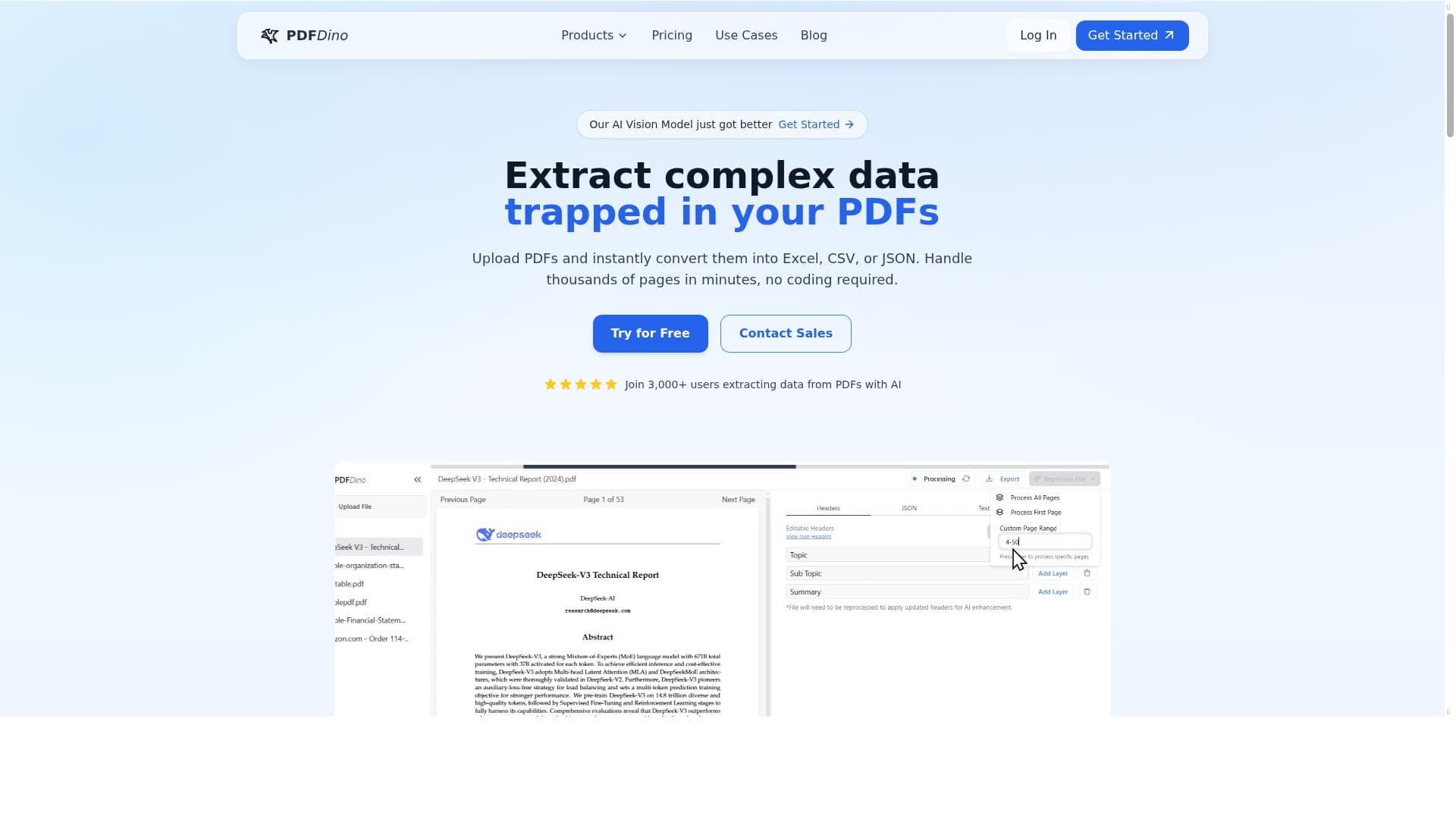
PDF Dino is an AI-powered PDF data extraction tool that transforms unstructured PDFs into structured tables, enabling quick export to Excel, CSV, or JSON without any coding. Perfect for businesses, researchers, and individuals, it excels at handling large volumes of pages swiftly and accurately, making complex data extraction simple and accessible.

Descripción
Extract text and create structured tables from PDFs. Simplify data extraction for businesses, researchers, and individuals with this AI-powered tool.
Descripción detallada
PDF Dino is an advanced AI-powered tool designed to streamline the extraction of text and data from PDF documents, transforming unstructured content into well-organized, structured tables. Its core purpose is to simplify and accelerate the process of data extraction for a wide range of users including businesses, researchers, and individuals who regularly work with large volumes of PDF files. By leveraging artificial intelligence, PDF Dino can intelligently interpret complex layouts and convert raw PDF data into usable formats without requiring any manual coding or technical expertise. This makes it an invaluable asset for anyone needing to unlock data trapped in PDFs quickly and accurately. One of the standout features of PDF Dino is its ability to convert unstructured PDFs into structured tables, which can then be exported into popular file formats such as Excel, CSV, or JSON. This flexibility allows users to seamlessly integrate extracted data into their existing workflows, databases, or analytics tools. The AI-driven extraction engine is capable of handling thousands of pages efficiently, making it suitable for large-scale projects and enterprise-level data processing. Additionally, the platform is designed with user-friendliness in mind, requiring no coding skills, which opens the door for non-technical users to harness powerful data extraction capabilities. PDF Dino is ideal for a variety of use cases across different sectors. Businesses can use it to automate the extraction of financial reports, invoices, contracts, and other critical documents, reducing manual labor and minimizing errors. Researchers benefit from its ability to quickly gather data from academic papers, reports, and studies, facilitating faster analysis and insights. Individuals who need to organize personal or professional documents can also leverage PDF Dino to convert PDFs into editable and searchable formats. Its speed and accuracy make it a preferred choice for anyone looking to save time and improve data reliability. Regarding pricing, PDF Dino operates on a paid subscription model, which typically includes tiered plans based on usage volume or feature access. While specific pricing details are not provided here, paid plans generally offer enhanced capabilities such as higher page processing limits, priority support, and additional export options. Potential users should visit the official website to review current pricing structures and select a plan that best fits their needs and budget. When compared to alternative PDF extraction tools, PDF Dino stands out due to its AI-powered approach that reduces the need for manual adjustments and coding. Many traditional PDF converters struggle with complex layouts or require technical know-how to extract data accurately. PDF Dino’s intuitive interface and robust AI algorithms provide a smoother, more reliable extraction experience. However, users should consider that, like any AI tool, the accuracy of extraction can vary depending on the quality and complexity of the source PDFs. Some highly specialized documents may require additional manual verification. Notable limitations include the absence of a free trial option, which might make it challenging for new users to evaluate the tool before committing financially. Additionally, while PDF Dino supports exporting to multiple formats, integration options with other software platforms or APIs are not explicitly mentioned, which could be a consideration for users seeking seamless automation within larger tech ecosystems. Despite these considerations, PDF Dino remains a powerful, user-friendly solution for anyone needing efficient, AI-driven PDF data extraction.
Características de la herramienta
- AI-powered PDF data extraction
- Convert unstructured PDFs into tables
- Export to Excel, CSV, or JSON
- Handle thousands of pages quickly
- No coding required
Descripción
PDF Dino is an AI-powered PDF data extraction tool that transforms unstructured PDFs into structured tables, enabling quick export to Excel, CSV, or JSON without any coding. Perfect for businesses, researchers, and individuals, it excels at handling large volumes of pages swiftly and accurately, making complex data extraction simple and accessible.
Extract text and create structured tables from PDFs. Simplify data extraction for businesses, researchers, and individuals with this AI-powered tool.
Descripción detallada
PDF Dino is an advanced AI-powered tool designed to streamline the extraction of text and data from PDF documents, transforming unstructured content into well-organized, structured tables. Its core purpose is to simplify and accelerate the process of data extraction for a wide range of users including businesses, researchers, and individuals who regularly work with large volumes of PDF files. By leveraging artificial intelligence, PDF Dino can intelligently interpret complex layouts and convert raw PDF data into usable formats without requiring any manual coding or technical expertise. This makes it an invaluable asset for anyone needing to unlock data trapped in PDFs quickly and accurately. One of the standout features of PDF Dino is its ability to convert unstructured PDFs into structured tables, which can then be exported into popular file formats such as Excel, CSV, or JSON. This flexibility allows users to seamlessly integrate extracted data into their existing workflows, databases, or analytics tools. The AI-driven extraction engine is capable of handling thousands of pages efficiently, making it suitable for large-scale projects and enterprise-level data processing. Additionally, the platform is designed with user-friendliness in mind, requiring no coding skills, which opens the door for non-technical users to harness powerful data extraction capabilities. PDF Dino is ideal for a variety of use cases across different sectors. Businesses can use it to automate the extraction of financial reports, invoices, contracts, and other critical documents, reducing manual labor and minimizing errors. Researchers benefit from its ability to quickly gather data from academic papers, reports, and studies, facilitating faster analysis and insights. Individuals who need to organize personal or professional documents can also leverage PDF Dino to convert PDFs into editable and searchable formats. Its speed and accuracy make it a preferred choice for anyone looking to save time and improve data reliability. Regarding pricing, PDF Dino operates on a paid subscription model, which typically includes tiered plans based on usage volume or feature access. While specific pricing details are not provided here, paid plans generally offer enhanced capabilities such as higher page processing limits, priority support, and additional export options. Potential users should visit the official website to review current pricing structures and select a plan that best fits their needs and budget. When compared to alternative PDF extraction tools, PDF Dino stands out due to its AI-powered approach that reduces the need for manual adjustments and coding. Many traditional PDF converters struggle with complex layouts or require technical know-how to extract data accurately. PDF Dino’s intuitive interface and robust AI algorithms provide a smoother, more reliable extraction experience. However, users should consider that, like any AI tool, the accuracy of extraction can vary depending on the quality and complexity of the source PDFs. Some highly specialized documents may require additional manual verification. Notable limitations include the absence of a free trial option, which might make it challenging for new users to evaluate the tool before committing financially. Additionally, while PDF Dino supports exporting to multiple formats, integration options with other software platforms or APIs are not explicitly mentioned, which could be a consideration for users seeking seamless automation within larger tech ecosystems. Despite these considerations, PDF Dino remains a powerful, user-friendly solution for anyone needing efficient, AI-driven PDF data extraction.
Preguntas frecuentes
What is PDF Dino?
PDF Dino is an AI-powered tool designed to extract text and convert unstructured PDF documents into structured tables, allowing users to export data into formats like Excel, CSV, or JSON without requiring any coding skills.
How much does PDF Dino cost?
PDF Dino operates on a paid subscription model with tiered plans based on usage and features. For detailed pricing information, users should visit the official PDF Dino website.
Who is PDF Dino best for?
PDF Dino is best suited for businesses, researchers, and individuals who need to extract and organize data from PDFs quickly and accurately, especially those handling large volumes of documents without coding expertise.
What are the main features of PDF Dino?
Key features include AI-powered PDF data extraction, conversion of unstructured PDFs into structured tables, export options to Excel, CSV, or JSON, the ability to process thousands of pages rapidly, and a user-friendly interface requiring no coding.
Does PDF Dino offer a free trial?
There is no information indicating that PDF Dino offers a free trial. Interested users should check the official website for the most current offers or trial options.
What integrations does PDF Dino support?
Specific integrations are not detailed, but PDF Dino supports exporting extracted data to common formats like Excel, CSV, and JSON, which can be imported into various software platforms.
How does PDF Dino work?
PDF Dino uses AI algorithms to analyze and extract text and tabular data from PDFs, converting unstructured content into structured tables that can be exported in multiple formats, all through an easy-to-use interface without requiring coding.
Reseñas
Aún no hay reseñas. Sé el primero en compartir tu experiencia.
Herramientas patrocinadas











































Herramientas recomendadas
Mantente al día con las últimas herramientas de IA
Obtén las últimas novedades, únete a nuestro boletín
Leído y confiado por 50,000+ lectores
Únete a la comunidad de IA más grande
¡Nuestra comunidad y equipo están aquí para ayudarte!
Tus comentarios ayudarán a Alice AI a mejorar en futuras versiones.








Enviar tu herramienta


PoweredByAI.app es un directorio de herramientas de IA que ayuda a personas, empresas y creadores a descubrir las mejores herramientas de IA para escritura, programación, diseño, productividad y más.
© 2026 , Producto de011BQ. Todos los derechos reservados.