Destacado en:Best AI Writing Tools
Destácate →🚀 Zaprep: Tus redes sociales al máximo. Empezar gratis — automatiza 1,000 DMs/mes y convierte el engagement en leads. con 1,000 DMs automatizados/mes.
Enviar tu herramienta
25,000+ herramientas de IA ya listadas
25K+Herramientas
400K+/moVistas
105K+/moVisitantes



✦
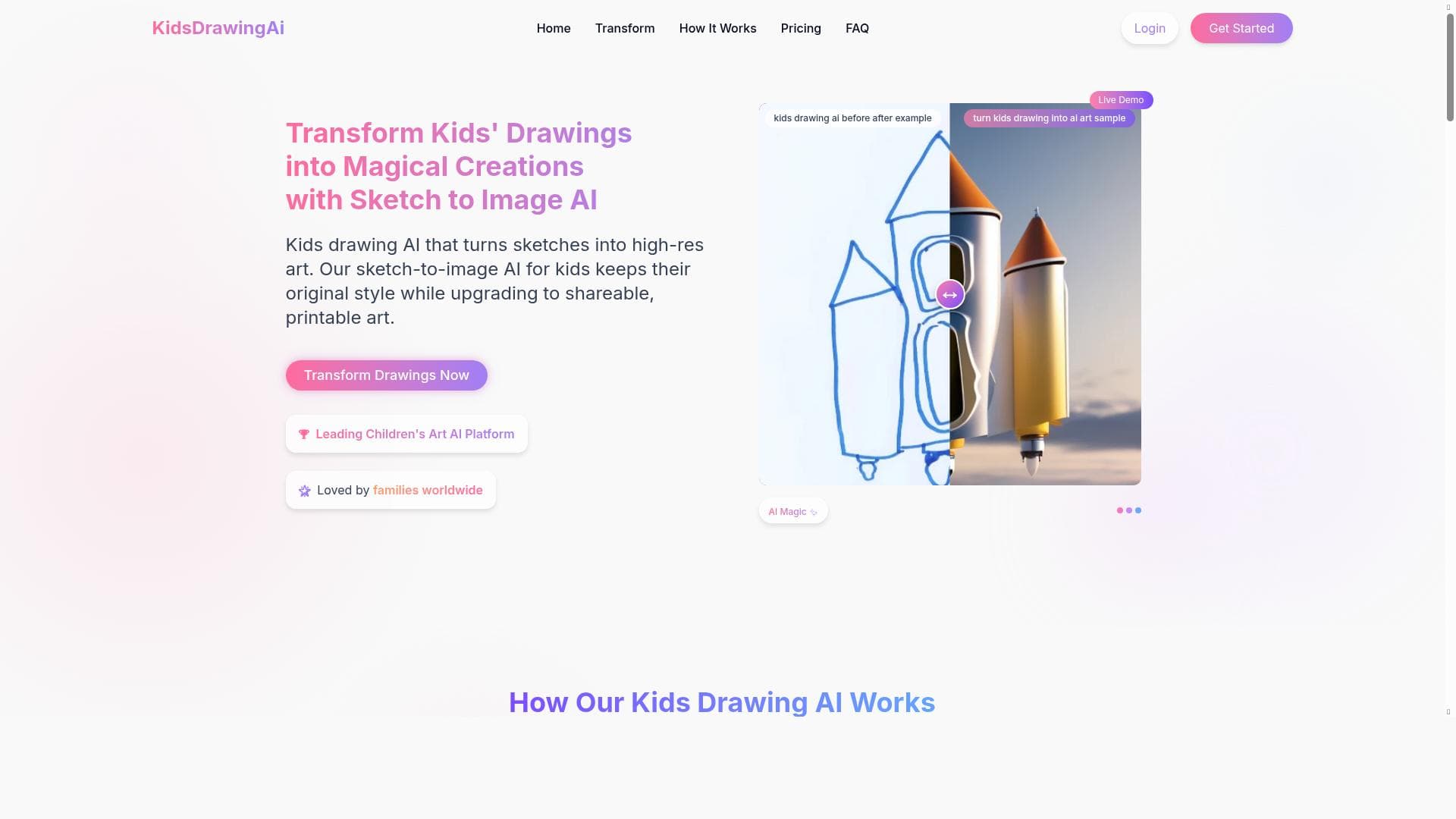
Kids Drawing AI transforms children's sketches into high-resolution digital art within seconds, making it an engaging and easy-to-use tool for kids, parents, and teachers. Its unique focus on child-friendly creativity and quick processing sets it apart as the perfect digital art companion for families and educational settings.
Descripción
Kids Drawing AI is a sketch-to-image AI tool designed specifically for kids, parents, and teachers. It allows users to upload children's drawings and transforms them into high-resolution art within seconds. The tool supports printing, sharing, or framing the generated artwork, making it a fun and creative digital art creator for children.
Descripción detallada
Kids Drawing AI is an innovative sketch-to-image artificial intelligence tool designed specifically to cater to children, their parents, and educators. Its core purpose is to transform simple children's drawings into vibrant, high-resolution digital artwork within seconds, making the creative process both fun and accessible. By bridging the gap between traditional hand-drawn sketches and digital art, Kids Drawing AI enables young artists to see their imagination come to life in a polished, professional format without requiring advanced artistic skills or software knowledge. The tool's key features revolve around ease of use and rapid transformation. Users can upload a child's original drawing—whether it’s a crayon sketch, pencil doodle, or marker illustration—and the AI instantly processes the image to generate a high-quality digital version. This process is optimized for speed, delivering results within seconds, which keeps children engaged and excited about their creations. Beyond simple conversion, the tool offers multiple output options such as printing the artwork on various mediums, sharing it directly on social media or via email, and framing the digital art for display. This versatility makes it ideal for preserving memories, gifting, or classroom projects. Kids Drawing AI is best suited for families with young children who want to encourage creativity and preserve their kids’ artwork in a modern format. Parents can use it to create personalized gifts or keepsakes, while teachers can incorporate it into art lessons or creative assignments, enhancing student engagement through technology. The tool’s intuitive interface ensures that even those with minimal tech experience can navigate it effortlessly, making it a practical choice for schools and home use alike. Regarding pricing, Kids Drawing AI typically offers a freemium model where users can try basic features for free, with premium plans unlocking higher resolution outputs, additional printing options, and advanced sharing capabilities. Subscription tiers may vary, providing flexibility for casual users or institutions needing bulk access. Detailed pricing information is available on their website, allowing users to select plans that best fit their needs and budget. Compared to alternative sketch-to-image AI tools, Kids Drawing AI stands out due to its exclusive focus on children’s artwork and its user-friendly design tailored for non-professional users. While other AI art generators may offer broader artistic styles or complex editing features, Kids Drawing AI prioritizes simplicity, speed, and child-centric functionality. This specialization makes it uniquely valuable for educational environments and family use, where ease and engagement are paramount. However, there are some considerations to keep in mind. The AI’s transformation is optimized for children’s sketches, so highly detailed or abstract adult drawings may not yield the best results. Additionally, while the tool excels at quick conversions, users seeking extensive customization or professional-grade editing might need supplementary software. Privacy and data security are also important; users should review the platform’s policies regarding uploaded artwork to ensure comfort with how images are stored and used. In summary, Kids Drawing AI offers a delightful and practical solution for turning children’s drawings into stunning digital art quickly and easily. Its focus on accessibility, speed, and child-friendly features makes it a standout tool for families and educators looking to inspire creativity and preserve artistic memories in a modern format.
Características de la herramienta
- Upload child's drawing
- AI transforms sketches into high-resolution art
- Fast processing within seconds
- Suitable for kids, parents, and teachers
- Options to print, share, or frame the artwork
Descripción
✦
Kids Drawing AI transforms children's sketches into high-resolution digital art within seconds, making it an engaging and easy-to-use tool for kids, parents, and teachers. Its unique focus on child-friendly creativity and quick processing sets it apart as the perfect digital art companion for families and educational settings.
Kids Drawing AI is a sketch-to-image AI tool designed specifically for kids, parents, and teachers. It allows users to upload children's drawings and transforms them into high-resolution art within seconds. The tool supports printing, sharing, or framing the generated artwork, making it a fun and creative digital art creator for children.
Descripción detallada
Kids Drawing AI is an innovative sketch-to-image artificial intelligence tool designed specifically to cater to children, their parents, and educators. Its core purpose is to transform simple children's drawings into vibrant, high-resolution digital artwork within seconds, making the creative process both fun and accessible. By bridging the gap between traditional hand-drawn sketches and digital art, Kids Drawing AI enables young artists to see their imagination come to life in a polished, professional format without requiring advanced artistic skills or software knowledge. The tool's key features revolve around ease of use and rapid transformation. Users can upload a child's original drawing—whether it’s a crayon sketch, pencil doodle, or marker illustration—and the AI instantly processes the image to generate a high-quality digital version. This process is optimized for speed, delivering results within seconds, which keeps children engaged and excited about their creations. Beyond simple conversion, the tool offers multiple output options such as printing the artwork on various mediums, sharing it directly on social media or via email, and framing the digital art for display. This versatility makes it ideal for preserving memories, gifting, or classroom projects. Kids Drawing AI is best suited for families with young children who want to encourage creativity and preserve their kids’ artwork in a modern format. Parents can use it to create personalized gifts or keepsakes, while teachers can incorporate it into art lessons or creative assignments, enhancing student engagement through technology. The tool’s intuitive interface ensures that even those with minimal tech experience can navigate it effortlessly, making it a practical choice for schools and home use alike. Regarding pricing, Kids Drawing AI typically offers a freemium model where users can try basic features for free, with premium plans unlocking higher resolution outputs, additional printing options, and advanced sharing capabilities. Subscription tiers may vary, providing flexibility for casual users or institutions needing bulk access. Detailed pricing information is available on their website, allowing users to select plans that best fit their needs and budget. Compared to alternative sketch-to-image AI tools, Kids Drawing AI stands out due to its exclusive focus on children’s artwork and its user-friendly design tailored for non-professional users. While other AI art generators may offer broader artistic styles or complex editing features, Kids Drawing AI prioritizes simplicity, speed, and child-centric functionality. This specialization makes it uniquely valuable for educational environments and family use, where ease and engagement are paramount. However, there are some considerations to keep in mind. The AI’s transformation is optimized for children’s sketches, so highly detailed or abstract adult drawings may not yield the best results. Additionally, while the tool excels at quick conversions, users seeking extensive customization or professional-grade editing might need supplementary software. Privacy and data security are also important; users should review the platform’s policies regarding uploaded artwork to ensure comfort with how images are stored and used. In summary, Kids Drawing AI offers a delightful and practical solution for turning children’s drawings into stunning digital art quickly and easily. Its focus on accessibility, speed, and child-friendly features makes it a standout tool for families and educators looking to inspire creativity and preserve artistic memories in a modern format.
Preguntas frecuentes
What is Kids Drawing AI?
Kids Drawing AI is an AI-powered sketch-to-image tool designed to transform children's hand-drawn sketches into high-resolution digital artwork quickly and easily. It is tailored for kids, parents, and teachers to encourage creativity and preserve children's drawings in a polished digital format.
How much does Kids Drawing AI cost?
Kids Drawing AI typically offers a freemium pricing model, allowing users to access basic features for free. Premium plans with enhanced resolution, printing options, and sharing capabilities are available through subscription tiers. Exact pricing details can be found on their official website.
Who is Kids Drawing AI best for?
Kids Drawing AI is best suited for families with young children, parents who want to preserve and share their kids’ artwork, and teachers looking to integrate creative digital projects into their classrooms. Its simple interface makes it accessible for users of all technical skill levels.
What are the main features of Kids Drawing AI?
The main features include uploading children's drawings, AI-powered transformation of sketches into high-resolution digital art, fast processing within seconds, and options to print, share, or frame the generated artwork. The tool is designed to be intuitive and child-friendly.
Does Kids Drawing AI offer a free trial?
Yes, Kids Drawing AI offers access to basic features for free, allowing users to try the tool before committing to any paid plans. This freemium approach helps users explore the core functionality without upfront costs.
What integrations does Kids Drawing AI support?
Kids Drawing AI primarily functions as a standalone web-based tool. While it supports sharing artwork via social media and email, it does not currently offer extensive third-party integrations or API access.
How does Kids Drawing AI work?
Users upload a child's hand-drawn sketch to the platform, where the AI analyzes the image and rapidly converts it into a high-resolution digital artwork. The process takes only seconds, after which users can print, share, or frame the finished piece.
Reseñas
0 reseñas
Aún no hay reseñas. Sé el primero en compartir tu experiencia.
Herramientas patrocinadas











































Herramientas recomendadas
Mantente al día con las últimas herramientas de IA
Obtén las últimas novedades, únete a nuestro boletín
Leído y confiado por 50,000+ lectores
Únete a la comunidad de IA más grande
¡Nuestra comunidad y equipo están aquí para ayudarte!
Tus comentarios ayudarán a Alice AI a mejorar en futuras versiones.








Enviar tu herramienta


PoweredByAI.app es un directorio de herramientas de IA que ayuda a personas, empresas y creadores a descubrir las mejores herramientas de IA para escritura, programación, diseño, productividad y más.
© 2026 , Producto de011BQ. Todos los derechos reservados.