🚀 Zaprep: Tus redes sociales al máximo. Empezar gratis — automatiza 1,000 DMs/mes y convierte el engagement en leads. con 1,000 DMs automatizados/mes.


¿Es esta tu herramienta de IA? Reclámala hoy.
Verifica la propiedad, gestiona tu perfil y desbloquea funciones de crecimiento.
Inspector revolutionizes front-end development by allowing you to visually edit your UI and instantly update your codebase through AI-powered integrations with Claude Code, Codex, and Cursor. Ideal for developers and designers seeking to eliminate design handoffs, it combines local execution with GitHub integration for a seamless, secure workflow.

Descripción
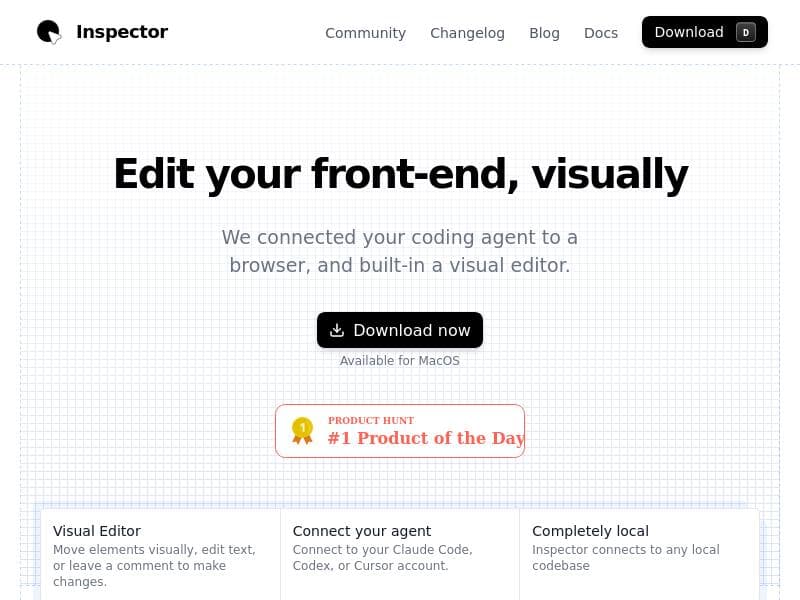
Inspector is a visual editor that connects to your favorite AI agent (Claude Code, Codex, Cursor). Click on an element in your UI, tweak it visually, and Inspector writes the change to your codebase. No more design handoff, just push to the repo.
Descripción detallada
Inspector is an innovative visual editor designed to streamline the UI development process by integrating directly with your existing codebase and AI coding agents like Claude Code, OpenAI Codex, and Cursor. Its core purpose is to eliminate the traditional design handoff bottleneck by allowing developers and designers to make visual tweaks directly on the user interface and have those changes automatically reflected in the source code. This approach significantly accelerates front-end development workflows, reduces errors, and fosters closer collaboration between design and engineering teams. At its heart, Inspector offers a highly intuitive visual editing environment where users can click on any text element within their UI to edit it in place. Beyond text, it supports drag-and-drop repositioning of UI elements, enabling rapid layout adjustments without manually modifying code. The tool seamlessly connects to powerful AI coding assistants such as Cursor, Claude Code, and OpenAI Codex, which help translate visual changes into clean, production-ready code updates. Inspector is compatible with popular modern frameworks including React, Next.js, and Vite, making it versatile for a wide range of front-end projects. One of Inspector’s standout capabilities is that it runs completely locally on your codebase, ensuring privacy and security by avoiding cloud-based code manipulation. Additionally, it integrates built-in source control features with GitHub, allowing users to commit and push changes directly from the visual editor. This tight integration with version control systems helps maintain code integrity and supports collaborative development workflows. Inspector is best suited for front-end developers, UI/UX designers, and product teams who want to reduce friction between design and development. It is particularly valuable in agile environments where rapid iteration and frequent UI updates are common. By enabling visual edits that automatically update the codebase, Inspector helps teams save time, reduce context switching, and avoid miscommunication that often occurs during design handoffs. It can also be a powerful tool for solo developers who want a more visual approach to coding UI changes. The pricing model for Inspector is freemium, allowing users to start with a free tier to explore its core functionalities. This makes it accessible for individual developers and small teams to evaluate and adopt the tool without upfront costs. Details on premium plans or enterprise options are not explicitly provided but may offer additional features or integrations. Compared to traditional design-to-code handoff tools or manual front-end editing, Inspector’s unique combination of visual editing with AI-powered code generation and local execution sets it apart. While many tools rely on cloud services or separate design files, Inspector’s direct manipulation of live UI elements and immediate code update capability provides a more seamless and efficient workflow. However, users should consider that its effectiveness depends on the quality of AI integrations and may require some familiarity with the supported frameworks. Notable limitations include the current focus on specific frameworks like React, Next.js, and Vite, which may limit applicability for projects using other technologies. Additionally, while local operation enhances security, it may require users to have a compatible development environment set up. As with any AI-assisted coding tool, there may be occasional inaccuracies or the need for manual code review to ensure optimal results. Overall, Inspector offers a compelling solution for teams looking to modernize their front-end development process by bridging the gap between visual design and code with AI assistance.
Características de la herramienta
- Visual text editing - click to edit any text element
- Drag and drop element positioning
- Connect to Cursor, Claude Code, or OpenAI Codex
- Works with React, Next.js, Vite, and more
- Completely local - runs on your codebase
- Built-in source control with GitHub integration
Descripción
Inspector revolutionizes front-end development by allowing you to visually edit your UI and instantly update your codebase through AI-powered integrations with Claude Code, Codex, and Cursor. Ideal for developers and designers seeking to eliminate design handoffs, it combines local execution with GitHub integration for a seamless, secure workflow.
Inspector is a visual editor that connects to your favorite AI agent (Claude Code, Codex, Cursor). Click on an element in your UI, tweak it visually, and Inspector writes the change to your codebase. No more design handoff, just push to the repo.
Descripción detallada
Inspector is an innovative visual editor designed to streamline the UI development process by integrating directly with your existing codebase and AI coding agents like Claude Code, OpenAI Codex, and Cursor. Its core purpose is to eliminate the traditional design handoff bottleneck by allowing developers and designers to make visual tweaks directly on the user interface and have those changes automatically reflected in the source code. This approach significantly accelerates front-end development workflows, reduces errors, and fosters closer collaboration between design and engineering teams. At its heart, Inspector offers a highly intuitive visual editing environment where users can click on any text element within their UI to edit it in place. Beyond text, it supports drag-and-drop repositioning of UI elements, enabling rapid layout adjustments without manually modifying code. The tool seamlessly connects to powerful AI coding assistants such as Cursor, Claude Code, and OpenAI Codex, which help translate visual changes into clean, production-ready code updates. Inspector is compatible with popular modern frameworks including React, Next.js, and Vite, making it versatile for a wide range of front-end projects. One of Inspector’s standout capabilities is that it runs completely locally on your codebase, ensuring privacy and security by avoiding cloud-based code manipulation. Additionally, it integrates built-in source control features with GitHub, allowing users to commit and push changes directly from the visual editor. This tight integration with version control systems helps maintain code integrity and supports collaborative development workflows. Inspector is best suited for front-end developers, UI/UX designers, and product teams who want to reduce friction between design and development. It is particularly valuable in agile environments where rapid iteration and frequent UI updates are common. By enabling visual edits that automatically update the codebase, Inspector helps teams save time, reduce context switching, and avoid miscommunication that often occurs during design handoffs. It can also be a powerful tool for solo developers who want a more visual approach to coding UI changes. The pricing model for Inspector is freemium, allowing users to start with a free tier to explore its core functionalities. This makes it accessible for individual developers and small teams to evaluate and adopt the tool without upfront costs. Details on premium plans or enterprise options are not explicitly provided but may offer additional features or integrations. Compared to traditional design-to-code handoff tools or manual front-end editing, Inspector’s unique combination of visual editing with AI-powered code generation and local execution sets it apart. While many tools rely on cloud services or separate design files, Inspector’s direct manipulation of live UI elements and immediate code update capability provides a more seamless and efficient workflow. However, users should consider that its effectiveness depends on the quality of AI integrations and may require some familiarity with the supported frameworks. Notable limitations include the current focus on specific frameworks like React, Next.js, and Vite, which may limit applicability for projects using other technologies. Additionally, while local operation enhances security, it may require users to have a compatible development environment set up. As with any AI-assisted coding tool, there may be occasional inaccuracies or the need for manual code review to ensure optimal results. Overall, Inspector offers a compelling solution for teams looking to modernize their front-end development process by bridging the gap between visual design and code with AI assistance.
Preguntas frecuentes
What is Inspector?
Inspector is a visual editor that connects to AI coding agents like Claude Code, OpenAI Codex, and Cursor, enabling users to click on UI elements, make visual changes, and have those updates automatically written to their codebase.
How much does Inspector cost?
Inspector offers a freemium pricing model, allowing users to access core features for free, with potential premium plans available for additional capabilities.
Who is Inspector best for?
Inspector is best suited for front-end developers, UI/UX designers, and product teams who want to streamline the design-to-code process and reduce friction in UI development workflows.
What are the main features of Inspector?
Key features include visual text editing, drag-and-drop element positioning, AI agent integration (Cursor, Claude Code, OpenAI Codex), compatibility with React, Next.js, and Vite, local operation on your codebase, and built-in GitHub source control integration.
Does Inspector offer a free trial?
Inspector provides a freemium plan that allows users to try core functionalities at no cost, effectively serving as a free trial.
What integrations does Inspector support?
Inspector integrates with AI coding agents such as Cursor, Claude Code, and OpenAI Codex, and supports frameworks like React, Next.js, and Vite. It also includes built-in GitHub integration for source control.
How does Inspector work?
Inspector works by letting users visually select and edit UI elements directly within their application interface. These visual changes are then translated into code updates by connected AI agents and applied locally to the user's codebase, with version control managed through GitHub integration.
Redes sociales
Usar herramientaReseñas
Aún no hay reseñas. Sé el primero en compartir tu experiencia.
Herramientas patrocinadas











































Herramientas recomendadas
Mantente al día con las últimas herramientas de IA
Obtén las últimas novedades, únete a nuestro boletín
Leído y confiado por 50,000+ lectores
Únete a la comunidad de IA más grande
¡Nuestra comunidad y equipo están aquí para ayudarte!
Tus comentarios ayudarán a Alice AI a mejorar en futuras versiones.








Enviar tu herramienta


PoweredByAI.app es un directorio de herramientas de IA que ayuda a personas, empresas y creadores a descubrir las mejores herramientas de IA para escritura, programación, diseño, productividad y más.
© 2026 , Producto de011BQ. Todos los derechos reservados.