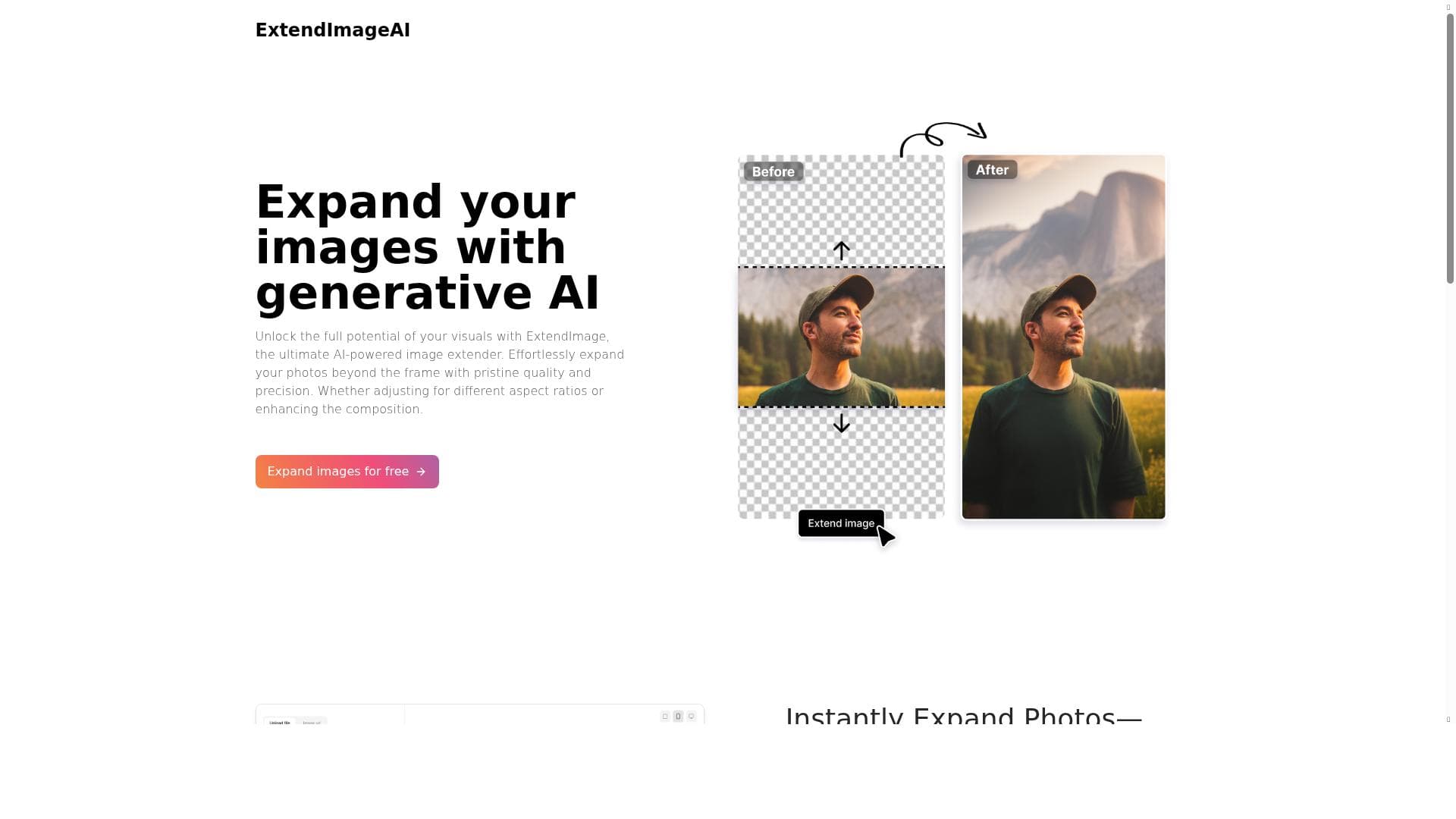


Extend Image AI leverages powerful generative AI models to effortlessly expand and enhance images up to four times their original size, perfectly matching style and color. Ideal for designers, photographers, and marketers, it transforms awkwardly framed or zoomed-in photos into versatile visuals ready for social media and marketing campaigns.

Descripción
Extend your images up to four times with generative artificial intelligence using any kinds of prompts. Powered by Stable Diffusion and Dalle
Descripción detallada
Extend Image AI is a cutting-edge generative artificial intelligence tool designed to expand and enhance images beyond their original boundaries. Utilizing advanced models such as Stable Diffusion and DALL·E, it allows users to seamlessly extend photos up to four times their initial size, all while maintaining the original image's style, color, and detail. This capability is particularly valuable for correcting framing issues, rescuing zoomed-in or cropped photos, and transforming vertical images into landscape formats without losing visual coherence. The core purpose of Extend Image AI is to empower creators, designers, marketers, and photographers to effortlessly manipulate and upscale images in ways that were previously time-consuming or technically challenging, using natural language prompts or freeform selections to guide the AI's generative process. Key features of Extend Image AI include its ability to precisely expand photos beyond their frame with minimal user input, correcting awkward or unbalanced compositions. The tool supports freeform selection, enabling users to target specific areas of an image for expansion, which is ideal for complex editing scenarios. Its AI engine meticulously matches the original image’s color palette and style, ensuring that the extended parts blend naturally and maintain visual consistency. Additionally, Extend Image AI can generate multiple image variations, giving users options to choose the best fit for their design or marketing needs. This versatility makes it suitable for creating adaptable visuals tailored for social media, advertising campaigns, websites, and other digital content platforms. Extend Image AI is best suited for graphic designers, digital marketers, content creators, photographers, and social media managers who require flexible image manipulation tools to enhance visual storytelling. For example, photographers can salvage photos with poor framing or limited backgrounds, while marketers can quickly generate banner images or social media posts in different aspect ratios without starting from scratch. The tool’s intuitive interface and AI-driven approach also make it accessible to non-experts who want to improve their images without deep technical knowledge. Regarding pricing, Extend Image AI operates on a freemium model, allowing users to access basic features for free with certain limitations, such as the number of images processed or resolution caps. Premium plans unlock higher resolution outputs, increased usage limits, and access to advanced features like multiple image generation and freeform selection. This pricing structure makes the tool accessible to casual users while providing scalable options for professionals and enterprises with more demanding needs. Compared to alternatives, Extend Image AI stands out due to its integration of both Stable Diffusion and DALL·E technologies, offering a unique combination of generative power and style matching. Many competing tools focus solely on upscaling or basic inpainting, whereas Extend Image AI provides comprehensive image extension capabilities with precise control over the output. Its ability to generate multiple variations and adapt images for different formats also gives it an edge in versatility. However, some alternatives might offer deeper integration with specific design software or more extensive editing toolsets, which could be a consideration for users seeking an all-in-one solution. Notable limitations include the dependency on AI-generated content, which may occasionally produce artifacts or less-than-perfect matches in highly complex or detailed images. Users should also be aware that the quality of the extension can vary based on the input image and prompt clarity. While the freemium plan is generous, heavy users or professionals will likely need to subscribe to premium tiers for optimal performance and output quality. Additionally, as with any AI tool, ethical considerations around image manipulation and copyright should be kept in mind when using Extend Image AI for commercial purposes.
Características de la herramienta
- Effortlessly expand photos beyond the frame with AI
- Correct awkward framing and salvage zoomed-in pictures
- Transform vertical photos into landscape format
- Meticulously refine images with precise detail
- Freeform selection for targeted image expansion
- AI matches original image's color and style
- Generate multiple image options for design alignment
- Create adaptable visuals for social media and marketing
Descripción
Extend Image AI leverages powerful generative AI models to effortlessly expand and enhance images up to four times their original size, perfectly matching style and color. Ideal for designers, photographers, and marketers, it transforms awkwardly framed or zoomed-in photos into versatile visuals ready for social media and marketing campaigns.
Extend your images up to four times with generative artificial intelligence using any kinds of prompts. Powered by Stable Diffusion and Dalle
Descripción detallada
Extend Image AI is a cutting-edge generative artificial intelligence tool designed to expand and enhance images beyond their original boundaries. Utilizing advanced models such as Stable Diffusion and DALL·E, it allows users to seamlessly extend photos up to four times their initial size, all while maintaining the original image's style, color, and detail. This capability is particularly valuable for correcting framing issues, rescuing zoomed-in or cropped photos, and transforming vertical images into landscape formats without losing visual coherence. The core purpose of Extend Image AI is to empower creators, designers, marketers, and photographers to effortlessly manipulate and upscale images in ways that were previously time-consuming or technically challenging, using natural language prompts or freeform selections to guide the AI's generative process. Key features of Extend Image AI include its ability to precisely expand photos beyond their frame with minimal user input, correcting awkward or unbalanced compositions. The tool supports freeform selection, enabling users to target specific areas of an image for expansion, which is ideal for complex editing scenarios. Its AI engine meticulously matches the original image’s color palette and style, ensuring that the extended parts blend naturally and maintain visual consistency. Additionally, Extend Image AI can generate multiple image variations, giving users options to choose the best fit for their design or marketing needs. This versatility makes it suitable for creating adaptable visuals tailored for social media, advertising campaigns, websites, and other digital content platforms. Extend Image AI is best suited for graphic designers, digital marketers, content creators, photographers, and social media managers who require flexible image manipulation tools to enhance visual storytelling. For example, photographers can salvage photos with poor framing or limited backgrounds, while marketers can quickly generate banner images or social media posts in different aspect ratios without starting from scratch. The tool’s intuitive interface and AI-driven approach also make it accessible to non-experts who want to improve their images without deep technical knowledge. Regarding pricing, Extend Image AI operates on a freemium model, allowing users to access basic features for free with certain limitations, such as the number of images processed or resolution caps. Premium plans unlock higher resolution outputs, increased usage limits, and access to advanced features like multiple image generation and freeform selection. This pricing structure makes the tool accessible to casual users while providing scalable options for professionals and enterprises with more demanding needs. Compared to alternatives, Extend Image AI stands out due to its integration of both Stable Diffusion and DALL·E technologies, offering a unique combination of generative power and style matching. Many competing tools focus solely on upscaling or basic inpainting, whereas Extend Image AI provides comprehensive image extension capabilities with precise control over the output. Its ability to generate multiple variations and adapt images for different formats also gives it an edge in versatility. However, some alternatives might offer deeper integration with specific design software or more extensive editing toolsets, which could be a consideration for users seeking an all-in-one solution. Notable limitations include the dependency on AI-generated content, which may occasionally produce artifacts or less-than-perfect matches in highly complex or detailed images. Users should also be aware that the quality of the extension can vary based on the input image and prompt clarity. While the freemium plan is generous, heavy users or professionals will likely need to subscribe to premium tiers for optimal performance and output quality. Additionally, as with any AI tool, ethical considerations around image manipulation and copyright should be kept in mind when using Extend Image AI for commercial purposes.
Preguntas frecuentes
What is Extend Image AI?
Extend Image AI is an AI-powered tool that expands and enhances images beyond their original frame using generative models like Stable Diffusion and DALL·E. It allows users to correct framing, salvage zoomed-in photos, and transform image formats seamlessly.
How much does Extend Image AI cost?
Extend Image AI offers a freemium pricing model with free access to basic features and usage limits. Premium plans provide higher resolution outputs, increased usage limits, and advanced features such as multiple image generation and freeform selection.
Who is Extend Image AI best for?
The tool is ideal for graphic designers, photographers, digital marketers, content creators, and social media managers who need to enhance, extend, or reformat images quickly and with high visual fidelity.
What are the main features of Extend Image AI?
Key features include effortless photo expansion beyond the frame, correction of awkward framing, transformation of vertical photos into landscape format, precise detail refinement, freeform selection for targeted expansion, AI color and style matching, multiple image option generation, and creation of adaptable visuals for marketing.
Does Extend Image AI offer a free trial?
Yes, Extend Image AI provides free access to basic features under its freemium plan, allowing users to try the tool before opting for premium subscriptions.
What integrations does Extend Image AI support?
Currently, Extend Image AI operates as a standalone web-based tool accessible via its website. Specific integrations with third-party design or editing software are not explicitly mentioned.
How does Extend Image AI work?
Extend Image AI uses generative AI models like Stable Diffusion and DALL·E to analyze the original image and extend it beyond its borders based on user prompts or freeform selections. The AI matches the original color and style to create seamless, natural-looking expansions.
Redes sociales
Usar herramientaReseñas
Aún no hay reseñas. Sé el primero en compartir tu experiencia.




















































