🚀 Zaprep: Tus redes sociales al máximo. Empezar gratis — automatiza 1,000 DMs/mes y convierte el engagement en leads. con 1,000 DMs automatizados/mes.


¿Es esta tu herramienta de IA? Reclámala hoy.
Verifica la propiedad, gestiona tu perfil y desbloquea funciones de crecimiento.
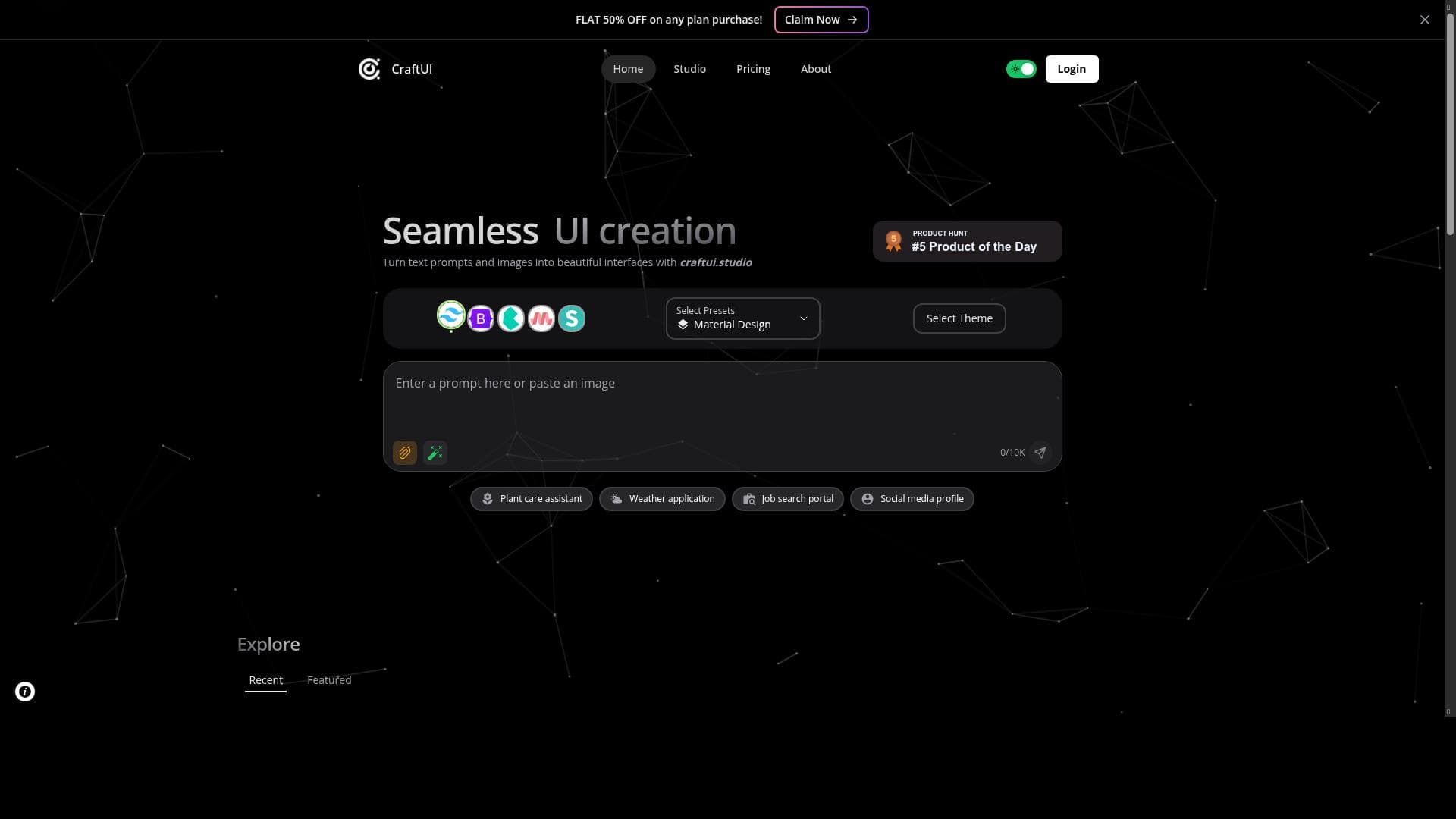
CraftUI revolutionizes UI development by instantly generating responsive components from text or image prompts, offering seamless export to Tailwind or Bootstrap. Ideal for designers and developers seeking rapid prototyping and polished interfaces without extensive coding.

Descripción
CraftUI is a cutting-edge web app that makes UI development easy by generating components from image/text prompts. Features Add Themes, Select Styling Frameworks, Explore Sections, Code View and Conversion, Version History, Element Inspection, Upvote Posts.
Descripción detallada
CraftUI is an innovative web application designed to simplify and accelerate the process of user interface (UI) development by leveraging artificial intelligence. At its core, CraftUI transforms textual descriptions or images into fully responsive UI components, enabling designers and developers to bypass much of the manual coding and design iteration traditionally required. This tool is particularly valuable for teams and individuals looking to rapidly prototype or build polished interfaces without extensive front-end development expertise. By automating the generation of UI elements based on user prompts, CraftUI streamlines the creative workflow and reduces the time from concept to implementation. One of the standout features of CraftUI is its ability to instantly design user interfaces using AI. Users can input either text prompts describing the desired UI or upload images as references, and the AI engine generates corresponding UI components that are responsive and ready for integration. This capability is enhanced by the option to select from various styling frameworks such as Tailwind CSS and Bootstrap, allowing users to export clean, framework-compatible code that fits seamlessly into existing projects. Additionally, CraftUI supports multiple visual styles including Minimal and Neumorphic, giving users flexibility to match their brand or project aesthetics. CraftUI also offers robust customization through theme management, enabling users to apply and modify theme colors easily across their UI components. Beyond design generation, the platform includes features like exploring pre-built sections to accelerate layout creation, a code view and conversion tool for inspecting and editing generated code, version history to track changes over time, and element inspection for detailed component analysis. The community aspect is supported by an upvote system for posts, fostering engagement and feedback among users. This tool is best suited for UI/UX designers, front-end developers, product managers, and startups who need to prototype or develop user interfaces quickly without sacrificing quality. It is particularly useful in agile environments where rapid iteration and responsiveness are critical. Freelancers and small teams can benefit from its ease of use and the ability to generate production-ready code that integrates with popular CSS frameworks. Additionally, educators and students in design and development fields may find CraftUI a valuable learning aid for understanding UI construction and styling. CraftUI operates on a freemium pricing model, making it accessible to a wide range of users. The free tier allows users to explore the core functionalities and generate UI components, while premium plans likely offer enhanced features such as extended version history, additional styling options, and priority support. This pricing approach enables users to evaluate the tool’s capabilities before committing financially, making it an attractive option for both hobbyists and professionals. When compared to alternatives, CraftUI stands out due to its dual input method of text and image prompts, combined with its seamless export options for Tailwind and Bootstrap frameworks. Many UI generation tools focus solely on either text-based or image-based inputs, but CraftUI’s hybrid approach provides greater flexibility. Furthermore, its comprehensive feature set including theme management, version control, and community engagement tools offers a more holistic UI development environment than many competitors. However, while CraftUI excels in rapid UI generation, users requiring highly customized or complex interactions may still need to supplement it with manual coding. Potential limitations include the learning curve associated with mastering the AI prompt techniques to achieve desired results, as well as possible constraints in handling highly specialized or unconventional UI designs. Additionally, as a web-based tool, performance and responsiveness may depend on internet connectivity and browser capabilities. Users should also consider that while the exported code is compatible with popular frameworks, further refinement might be necessary to meet specific project standards or accessibility requirements. In summary, CraftUI is a powerful AI-driven UI development platform that democratizes interface design by converting simple prompts into sophisticated, responsive components. Its rich feature set, flexible styling options, and integration with popular CSS frameworks make it an excellent choice for designers and developers aiming to streamline their workflow and accelerate product delivery.
Características de la herramienta
- Design user interfaces instantly with AI
- Convert text prompts or images into responsive UIs
- Choose styles like Minimal or Neumorphic
- Apply theme colors
- Export with Tailwind or Bootstrap
Descripción
CraftUI revolutionizes UI development by instantly generating responsive components from text or image prompts, offering seamless export to Tailwind or Bootstrap. Ideal for designers and developers seeking rapid prototyping and polished interfaces without extensive coding.
CraftUI is a cutting-edge web app that makes UI development easy by generating components from image/text prompts. Features Add Themes, Select Styling Frameworks, Explore Sections, Code View and Conversion, Version History, Element Inspection, Upvote Posts.
Descripción detallada
CraftUI is an innovative web application designed to simplify and accelerate the process of user interface (UI) development by leveraging artificial intelligence. At its core, CraftUI transforms textual descriptions or images into fully responsive UI components, enabling designers and developers to bypass much of the manual coding and design iteration traditionally required. This tool is particularly valuable for teams and individuals looking to rapidly prototype or build polished interfaces without extensive front-end development expertise. By automating the generation of UI elements based on user prompts, CraftUI streamlines the creative workflow and reduces the time from concept to implementation. One of the standout features of CraftUI is its ability to instantly design user interfaces using AI. Users can input either text prompts describing the desired UI or upload images as references, and the AI engine generates corresponding UI components that are responsive and ready for integration. This capability is enhanced by the option to select from various styling frameworks such as Tailwind CSS and Bootstrap, allowing users to export clean, framework-compatible code that fits seamlessly into existing projects. Additionally, CraftUI supports multiple visual styles including Minimal and Neumorphic, giving users flexibility to match their brand or project aesthetics. CraftUI also offers robust customization through theme management, enabling users to apply and modify theme colors easily across their UI components. Beyond design generation, the platform includes features like exploring pre-built sections to accelerate layout creation, a code view and conversion tool for inspecting and editing generated code, version history to track changes over time, and element inspection for detailed component analysis. The community aspect is supported by an upvote system for posts, fostering engagement and feedback among users. This tool is best suited for UI/UX designers, front-end developers, product managers, and startups who need to prototype or develop user interfaces quickly without sacrificing quality. It is particularly useful in agile environments where rapid iteration and responsiveness are critical. Freelancers and small teams can benefit from its ease of use and the ability to generate production-ready code that integrates with popular CSS frameworks. Additionally, educators and students in design and development fields may find CraftUI a valuable learning aid for understanding UI construction and styling. CraftUI operates on a freemium pricing model, making it accessible to a wide range of users. The free tier allows users to explore the core functionalities and generate UI components, while premium plans likely offer enhanced features such as extended version history, additional styling options, and priority support. This pricing approach enables users to evaluate the tool’s capabilities before committing financially, making it an attractive option for both hobbyists and professionals. When compared to alternatives, CraftUI stands out due to its dual input method of text and image prompts, combined with its seamless export options for Tailwind and Bootstrap frameworks. Many UI generation tools focus solely on either text-based or image-based inputs, but CraftUI’s hybrid approach provides greater flexibility. Furthermore, its comprehensive feature set including theme management, version control, and community engagement tools offers a more holistic UI development environment than many competitors. However, while CraftUI excels in rapid UI generation, users requiring highly customized or complex interactions may still need to supplement it with manual coding. Potential limitations include the learning curve associated with mastering the AI prompt techniques to achieve desired results, as well as possible constraints in handling highly specialized or unconventional UI designs. Additionally, as a web-based tool, performance and responsiveness may depend on internet connectivity and browser capabilities. Users should also consider that while the exported code is compatible with popular frameworks, further refinement might be necessary to meet specific project standards or accessibility requirements. In summary, CraftUI is a powerful AI-driven UI development platform that democratizes interface design by converting simple prompts into sophisticated, responsive components. Its rich feature set, flexible styling options, and integration with popular CSS frameworks make it an excellent choice for designers and developers aiming to streamline their workflow and accelerate product delivery.
Preguntas frecuentes
What is CraftUI?
CraftUI is a web-based AI-powered tool that simplifies UI development by generating responsive user interface components from text or image prompts, allowing users to design and export styled UI elements quickly.
How much does CraftUI cost?
CraftUI offers a freemium pricing model, providing free access to core features with options to upgrade for additional capabilities such as extended version history, advanced styling options, and priority support.
Who is CraftUI best for?
CraftUI is ideal for UI/UX designers, front-end developers, product managers, startups, freelancers, and educators who need to rapidly prototype or build responsive user interfaces with minimal manual coding.
What are the main features of CraftUI?
Key features include AI-driven UI design from text or image prompts, style selection (Minimal, Neumorphic), theme color application, export options for Tailwind and Bootstrap frameworks, version history, element inspection, code view and conversion, and community upvoting.
Does CraftUI offer a free trial?
Yes, CraftUI operates on a freemium model, allowing users to access and try core features for free without an explicit time-limited trial.
What integrations does CraftUI support?
CraftUI supports exporting generated UI components with code compatible with popular styling frameworks such as Tailwind CSS and Bootstrap, facilitating integration into existing front-end projects.
How does CraftUI work?
Users provide text descriptions or upload images as prompts, and CraftUI’s AI engine generates responsive UI components based on these inputs. Users can customize styles, apply themes, inspect elements, and export the code for use in their projects.
Redes sociales
Usar herramientaReseñas
Aún no hay reseñas. Sé el primero en compartir tu experiencia.
Herramientas patrocinadas











































Herramientas recomendadas
Mantente al día con las últimas herramientas de IA
Obtén las últimas novedades, únete a nuestro boletín
Leído y confiado por 50,000+ lectores
Únete a la comunidad de IA más grande
¡Nuestra comunidad y equipo están aquí para ayudarte!
Tus comentarios ayudarán a Alice AI a mejorar en futuras versiones.








Enviar tu herramienta


PoweredByAI.app es un directorio de herramientas de IA que ayuda a personas, empresas y creadores a descubrir las mejores herramientas de IA para escritura, programación, diseño, productividad y más.
© 2026 , Producto de011BQ. Todos los derechos reservados.