Destacado en:Best AI Writing Tools
Destácate →🚀 Zaprep: Tus redes sociales al máximo. Empezar gratis — automatiza 1,000 DMs/mes y convierte el engagement en leads. con 1,000 DMs automatizados/mes.
Enviar tu herramienta
25,000+ herramientas de IA ya listadas
25K+Herramientas
400K+/moVistas
105K+/moVisitantes



✦
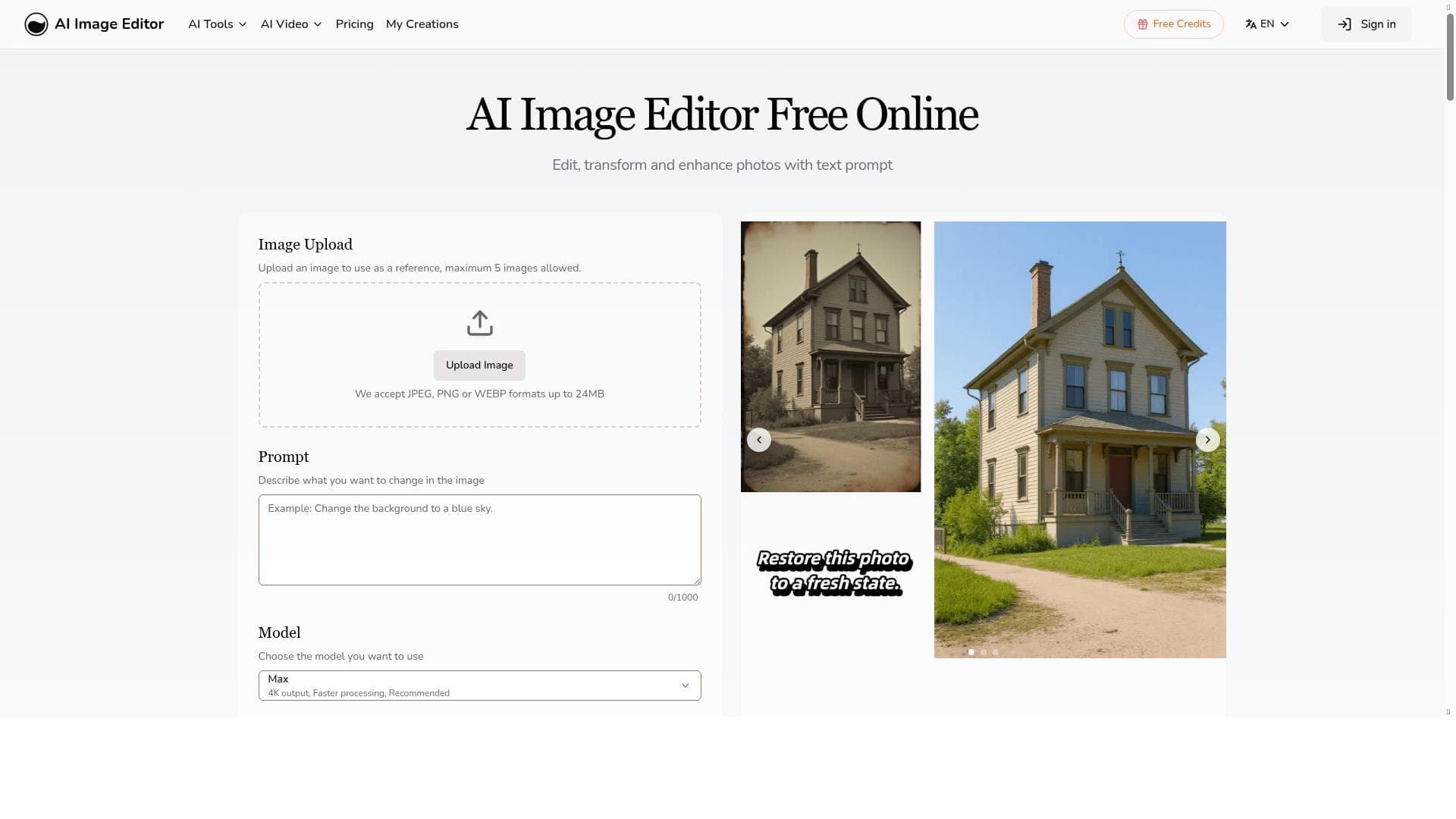
AI Image Editor is a free, browser-based AI-powered photo editing tool that transforms images with features like AI clothes changing, photo-to-sketch conversion, 4K upscaling, and watermark removal—all without requiring downloads or sign-ups. Ideal for creatives, marketers, and casual users, it delivers professional-quality edits quickly and effortlessly through intuitive text prompts.

Descripción
AI Image Editor is a free online AI image editing tool that requires no download or sign-up. Features include AI clothes changer, photo to sketch, 4K image upscaling, watermark remover, and text-to-edit capabilities. Transform your photos instantly with advanced AI technology.
Descripción detallada
AI Image Editor is a versatile and powerful online tool designed to simplify and enhance the process of image editing using advanced artificial intelligence technology. Its core purpose is to provide users with a seamless, accessible platform for transforming photos without the need for complex software installations or prior graphic design expertise. By leveraging AI-driven capabilities, this tool allows users to perform sophisticated edits such as changing clothing in images, converting photos into sketches, upscaling images to ultra-high 4K resolution, removing watermarks, and editing images through intuitive text prompts. This makes AI Image Editor an ideal solution for anyone looking to quickly and effectively enhance or modify images with professional results. One of the standout features of AI Image Editor is its text-to-edit functionality, which enables users to describe the desired changes in natural language and have the AI execute those edits automatically. This removes the traditional barriers of manual editing and complex tool navigation. The AI clothes changer is another innovative feature that allows users to alter the clothing in photos realistically, which is particularly useful for fashion enthusiasts, marketers, or social media content creators. The photo to sketch conversion offers a creative way to transform images into artistic sketches, opening up new possibilities for designers and hobbyists alike. Additionally, the 4K image upscaling feature enhances photo resolution dramatically, making it perfect for printing or high-quality digital displays. The watermark remover tool is a practical addition for users who need clean images free from unwanted marks, especially in professional or commercial contexts. AI Image Editor is best suited for a wide range of users including photographers, graphic designers, marketers, social media influencers, and casual users who want to enhance their photos without investing in expensive software or learning complex editing techniques. For professionals, it offers a quick way to produce polished images that can be used in portfolios, advertisements, or social media campaigns. For casual users, it provides an easy and fun way to experiment with photo transformations and enhancements. Its no-download, no-sign-up approach ensures immediate access, making it highly convenient for users who need fast results without commitments. One of the most attractive aspects of AI Image Editor is that it is completely free to use. There are no hidden fees or subscription plans, which lowers the barrier to entry and encourages widespread adoption. This free pricing model is particularly beneficial for students, hobbyists, and small businesses with limited budgets. Users can access all the core features without restrictions, making it a highly cost-effective solution compared to traditional paid editing software. When compared to alternatives, AI Image Editor stands out due to its combination of advanced AI capabilities and user-friendly interface. Unlike traditional photo editors that require manual adjustments and steep learning curves, this tool automates complex edits through AI, saving time and effort. While some competitors may offer similar AI features, many require downloads, sign-ups, or paid subscriptions, which AI Image Editor avoids. However, it may not yet match the depth of control and customization available in professional-grade software like Adobe Photoshop, which remains the standard for detailed manual editing. Despite its many strengths, AI Image Editor has some limitations to consider. As an online tool, its performance depends on internet connectivity and server availability. The AI-driven edits, while impressive, may occasionally produce results that require minor manual touch-ups, especially in highly detailed or complex images. Additionally, users seeking very specialized or niche editing functions might find the tool less comprehensive than dedicated desktop software. Nonetheless, for most everyday editing needs and creative transformations, AI Image Editor offers a robust, accessible, and free solution that leverages the latest AI technology to empower users of all skill levels.
Características de la herramienta
- Edit images with text prompts
- Enhance photos
- Transform images
- Professional results without Photoshop skills
Descripción
✦
AI Image Editor is a free, browser-based AI-powered photo editing tool that transforms images with features like AI clothes changing, photo-to-sketch conversion, 4K upscaling, and watermark removal—all without requiring downloads or sign-ups. Ideal for creatives, marketers, and casual users, it delivers professional-quality edits quickly and effortlessly through intuitive text prompts.
AI Image Editor is a free online AI image editing tool that requires no download or sign-up. Features include AI clothes changer, photo to sketch, 4K image upscaling, watermark remover, and text-to-edit capabilities. Transform your photos instantly with advanced AI technology.
Descripción detallada
AI Image Editor is a versatile and powerful online tool designed to simplify and enhance the process of image editing using advanced artificial intelligence technology. Its core purpose is to provide users with a seamless, accessible platform for transforming photos without the need for complex software installations or prior graphic design expertise. By leveraging AI-driven capabilities, this tool allows users to perform sophisticated edits such as changing clothing in images, converting photos into sketches, upscaling images to ultra-high 4K resolution, removing watermarks, and editing images through intuitive text prompts. This makes AI Image Editor an ideal solution for anyone looking to quickly and effectively enhance or modify images with professional results. One of the standout features of AI Image Editor is its text-to-edit functionality, which enables users to describe the desired changes in natural language and have the AI execute those edits automatically. This removes the traditional barriers of manual editing and complex tool navigation. The AI clothes changer is another innovative feature that allows users to alter the clothing in photos realistically, which is particularly useful for fashion enthusiasts, marketers, or social media content creators. The photo to sketch conversion offers a creative way to transform images into artistic sketches, opening up new possibilities for designers and hobbyists alike. Additionally, the 4K image upscaling feature enhances photo resolution dramatically, making it perfect for printing or high-quality digital displays. The watermark remover tool is a practical addition for users who need clean images free from unwanted marks, especially in professional or commercial contexts. AI Image Editor is best suited for a wide range of users including photographers, graphic designers, marketers, social media influencers, and casual users who want to enhance their photos without investing in expensive software or learning complex editing techniques. For professionals, it offers a quick way to produce polished images that can be used in portfolios, advertisements, or social media campaigns. For casual users, it provides an easy and fun way to experiment with photo transformations and enhancements. Its no-download, no-sign-up approach ensures immediate access, making it highly convenient for users who need fast results without commitments. One of the most attractive aspects of AI Image Editor is that it is completely free to use. There are no hidden fees or subscription plans, which lowers the barrier to entry and encourages widespread adoption. This free pricing model is particularly beneficial for students, hobbyists, and small businesses with limited budgets. Users can access all the core features without restrictions, making it a highly cost-effective solution compared to traditional paid editing software. When compared to alternatives, AI Image Editor stands out due to its combination of advanced AI capabilities and user-friendly interface. Unlike traditional photo editors that require manual adjustments and steep learning curves, this tool automates complex edits through AI, saving time and effort. While some competitors may offer similar AI features, many require downloads, sign-ups, or paid subscriptions, which AI Image Editor avoids. However, it may not yet match the depth of control and customization available in professional-grade software like Adobe Photoshop, which remains the standard for detailed manual editing. Despite its many strengths, AI Image Editor has some limitations to consider. As an online tool, its performance depends on internet connectivity and server availability. The AI-driven edits, while impressive, may occasionally produce results that require minor manual touch-ups, especially in highly detailed or complex images. Additionally, users seeking very specialized or niche editing functions might find the tool less comprehensive than dedicated desktop software. Nonetheless, for most everyday editing needs and creative transformations, AI Image Editor offers a robust, accessible, and free solution that leverages the latest AI technology to empower users of all skill levels.
Preguntas frecuentes
What is ai-imageeditor?
AI Image Editor is a free online AI-powered image editing tool that allows users to enhance, transform, and edit photos using advanced artificial intelligence technology without needing to download software or create an account.
How much does ai-imageeditor cost?
AI Image Editor is completely free to use, with no hidden fees or subscription plans.
Who is ai-imageeditor best for?
It is ideal for photographers, graphic designers, marketers, social media influencers, and casual users who want professional-quality photo edits quickly and easily without complex software.
What are the main features of ai-imageeditor?
Key features include AI clothes changer, photo to sketch conversion, 4K image upscaling, watermark removal, and text-to-edit capabilities that allow users to modify images using natural language prompts.
Does ai-imageeditor offer a free trial?
Since AI Image Editor is entirely free to use, there is no need for a free trial.
What integrations does ai-imageeditor support?
AI Image Editor is a standalone online tool and does not currently offer integrations with other platforms or software.
How does ai-imageeditor work?
The tool uses advanced AI models to analyze and process images based on user inputs, including text prompts, to perform edits such as changing clothing, converting photos to sketches, enhancing resolution, and removing watermarks—all through a simple web interface.
Reseñas
0 reseñas
Aún no hay reseñas. Sé el primero en compartir tu experiencia.
Herramientas patrocinadas











































Herramientas recomendadas
Mantente al día con las últimas herramientas de IA
Obtén las últimas novedades, únete a nuestro boletín
Leído y confiado por 50,000+ lectores
Únete a la comunidad de IA más grande
¡Nuestra comunidad y equipo están aquí para ayudarte!
Tus comentarios ayudarán a Alice AI a mejorar en futuras versiones.








Enviar tu herramienta


PoweredByAI.app es un directorio de herramientas de IA que ayuda a personas, empresas y creadores a descubrir las mejores herramientas de IA para escritura, programación, diseño, productividad y más.
© 2026 , Producto de011BQ. Todos los derechos reservados.