

Ist das dein KI-Tool? Beanspruche es noch heute.
Bestätige die Inhaberschaft, verwalte dein Profil und schalte Wachstumsfunktionen frei.
Page to Markdown by StarterBuild is a free, privacy-focused Chrome extension that converts entire webpages or selected content into clean Markdown format locally, without requiring accounts or sending data to servers. Ideal for developers, researchers, and content creators, it simplifies capturing web content for AI workflows, documentation, and note-taking with effortless Markdown export and download options.

Beschreibung
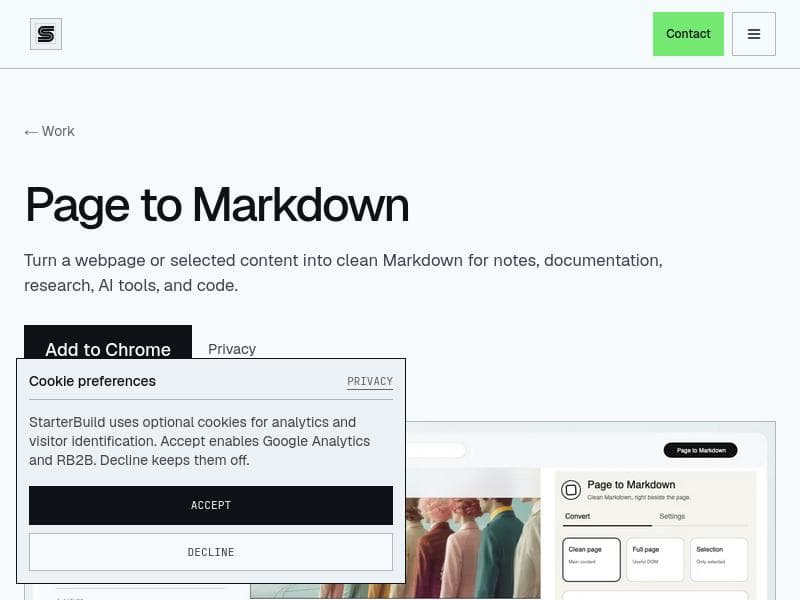
Page to Markdown is a local-first Chrome side panel that turns the page you’re reading, or just the passage you select, into clean Markdown. Choose Clean page, Full page, or Selection; keep the links, tables, and code blocks you need; then copy it or download anmd file. Built for research, notes, documentation, AI workflows, and your trusty AI slop boys. No account. No remote processing. Just markdown baby!
Ausführliche Beschreibung
Page to Markdown by StarterBuild is a free Chrome extension designed to convert entire webpages or selected portions of content into clean, well-structured Markdown format. Its core purpose is to streamline the process of capturing web content for use in AI workflows, note-taking, documentation, research, and coding projects. By providing a simple, local-only conversion process, it eliminates the need for accounts or data transmission to external servers, ensuring user privacy and security. This makes it an ideal tool for users who prioritize data control and want a hassle-free way to convert HTML content into Markdown without additional overhead. The extension’s key features include the ability to convert full webpages or just selected content into Markdown, supporting various content types such as articles, documentation, blog posts, and recipes. Users can either copy the generated Markdown directly to their clipboard or download it as a .md file for easy integration into their workflows. The conversion process is performed entirely locally within the browser, which means there is no tracking, analytics, or server-side processing involved. This local-only approach not only enhances privacy but also improves speed and reliability. The tool supports clean and readable Markdown output, making it suitable for developers, researchers, and writers who need to preserve formatting and structure when migrating content from the web. Page to Markdown is best suited for professionals and enthusiasts who frequently work with web content and require Markdown format for their projects. This includes software developers who document code or APIs, researchers compiling notes from online articles, content creators repurposing blog posts, and students or academics gathering references. Its seamless integration as a Chrome extension means it fits naturally into everyday browsing, allowing users to convert content on the fly without interrupting their workflow. The tool is particularly valuable for those leveraging AI tools that accept Markdown input, enabling smooth content preparation for AI-driven writing, summarization, or analysis. In terms of pricing, Page to Markdown by StarterBuild is completely free to use. There are no paid plans or premium tiers, making it accessible to anyone with a Chrome browser. This free availability, combined with its privacy-focused design, makes it an attractive option compared to other Markdown converters that may require subscriptions or cloud-based processing. Compared to alternatives, Page to Markdown stands out due to its local-only operation and zero data sharing policy. Many other Markdown converters rely on server-side processing, which can raise privacy concerns and introduce latency. Additionally, some tools require user accounts or embed tracking scripts, which Page to Markdown explicitly avoids. While some competitors offer more extensive formatting options or integrations, Page to Markdown’s simplicity and focus on clean, reliable conversion make it a strong choice for users who want a straightforward, trustworthy solution without complexity. However, there are some limitations to consider. Since the extension operates entirely within the browser, it may not handle extremely complex webpages with dynamic content or advanced styling perfectly. Users looking for highly customized Markdown output or integration with specific note-taking apps might find the feature set basic. Also, as a Chrome-only extension, it is not available on other browsers, which could limit accessibility for some users. Despite these minor constraints, Page to Markdown by StarterBuild delivers excellent value for its intended use cases, providing a fast, private, and easy way to convert web content into Markdown format.
Tool-Funktionen
- Clean page conversion for articles, documentation, posts, and recipes
- Full page and selected-content Markdown conversion
- Markdown copy and .md download
- Local-only conversion with no account, tracking, analytics, or servers
Beschreibung
Page to Markdown by StarterBuild is a free, privacy-focused Chrome extension that converts entire webpages or selected content into clean Markdown format locally, without requiring accounts or sending data to servers. Ideal for developers, researchers, and content creators, it simplifies capturing web content for AI workflows, documentation, and note-taking with effortless Markdown export and download options.
Page to Markdown is a local-first Chrome side panel that turns the page you’re reading, or just the passage you select, into clean Markdown. Choose Clean page, Full page, or Selection; keep the links, tables, and code blocks you need; then copy it or download anmd file. Built for research, notes, documentation, AI workflows, and your trusty AI slop boys. No account. No remote processing. Just markdown baby!
Ausführliche Beschreibung
Page to Markdown by StarterBuild is a free Chrome extension designed to convert entire webpages or selected portions of content into clean, well-structured Markdown format. Its core purpose is to streamline the process of capturing web content for use in AI workflows, note-taking, documentation, research, and coding projects. By providing a simple, local-only conversion process, it eliminates the need for accounts or data transmission to external servers, ensuring user privacy and security. This makes it an ideal tool for users who prioritize data control and want a hassle-free way to convert HTML content into Markdown without additional overhead. The extension’s key features include the ability to convert full webpages or just selected content into Markdown, supporting various content types such as articles, documentation, blog posts, and recipes. Users can either copy the generated Markdown directly to their clipboard or download it as a .md file for easy integration into their workflows. The conversion process is performed entirely locally within the browser, which means there is no tracking, analytics, or server-side processing involved. This local-only approach not only enhances privacy but also improves speed and reliability. The tool supports clean and readable Markdown output, making it suitable for developers, researchers, and writers who need to preserve formatting and structure when migrating content from the web. Page to Markdown is best suited for professionals and enthusiasts who frequently work with web content and require Markdown format for their projects. This includes software developers who document code or APIs, researchers compiling notes from online articles, content creators repurposing blog posts, and students or academics gathering references. Its seamless integration as a Chrome extension means it fits naturally into everyday browsing, allowing users to convert content on the fly without interrupting their workflow. The tool is particularly valuable for those leveraging AI tools that accept Markdown input, enabling smooth content preparation for AI-driven writing, summarization, or analysis. In terms of pricing, Page to Markdown by StarterBuild is completely free to use. There are no paid plans or premium tiers, making it accessible to anyone with a Chrome browser. This free availability, combined with its privacy-focused design, makes it an attractive option compared to other Markdown converters that may require subscriptions or cloud-based processing. Compared to alternatives, Page to Markdown stands out due to its local-only operation and zero data sharing policy. Many other Markdown converters rely on server-side processing, which can raise privacy concerns and introduce latency. Additionally, some tools require user accounts or embed tracking scripts, which Page to Markdown explicitly avoids. While some competitors offer more extensive formatting options or integrations, Page to Markdown’s simplicity and focus on clean, reliable conversion make it a strong choice for users who want a straightforward, trustworthy solution without complexity. However, there are some limitations to consider. Since the extension operates entirely within the browser, it may not handle extremely complex webpages with dynamic content or advanced styling perfectly. Users looking for highly customized Markdown output or integration with specific note-taking apps might find the feature set basic. Also, as a Chrome-only extension, it is not available on other browsers, which could limit accessibility for some users. Despite these minor constraints, Page to Markdown by StarterBuild delivers excellent value for its intended use cases, providing a fast, private, and easy way to convert web content into Markdown format.
Häufig gestellte Fragen
What is Page to Markdown by StarterBuild?
Page to Markdown by StarterBuild is a free Chrome extension that converts full webpages or selected content into clean Markdown format, designed to support workflows involving AI tools, notes, documentation, research, and coding.
How much does Page to Markdown by StarterBuild cost?
Page to Markdown by StarterBuild is completely free to use with no paid plans or subscriptions.
Who is Page to Markdown by StarterBuild best for?
It is best suited for developers, researchers, content creators, and anyone who frequently needs to convert web content into Markdown for AI workflows, documentation, note-taking, or coding projects.
What are the main features of Page to Markdown by StarterBuild?
Key features include full page and selected content Markdown conversion, clean output suitable for articles and documentation, the ability to copy Markdown or download it as a .md file, and a local-only conversion process with no accounts, tracking, or server involvement.
Does Page to Markdown by StarterBuild offer a free trial?
Since the tool is entirely free, there is no need for a trial period; all features are available without cost.
What integrations does Page to Markdown by StarterBuild support?
Page to Markdown operates as a standalone Chrome extension and does not have built-in integrations, but its Markdown output can be used with any tool or platform that supports Markdown, including AI tools, note-taking apps, and code editors.
How does Page to Markdown by StarterBuild work?
The extension converts webpages or selected content into Markdown format locally within the Chrome browser, allowing users to copy the Markdown text or download it as a .md file without sending any data to external servers or requiring user accounts.
Social Media
Tool nutzenBewertungen
Noch keine Bewertungen. Teile als Erste:r deine Erfahrung.






















































