

Ist das dein KI-Tool? Beanspruche es noch heute.
Bestätige die Inhaberschaft, verwalte dein Profil und schalte Wachstumsfunktionen frei.
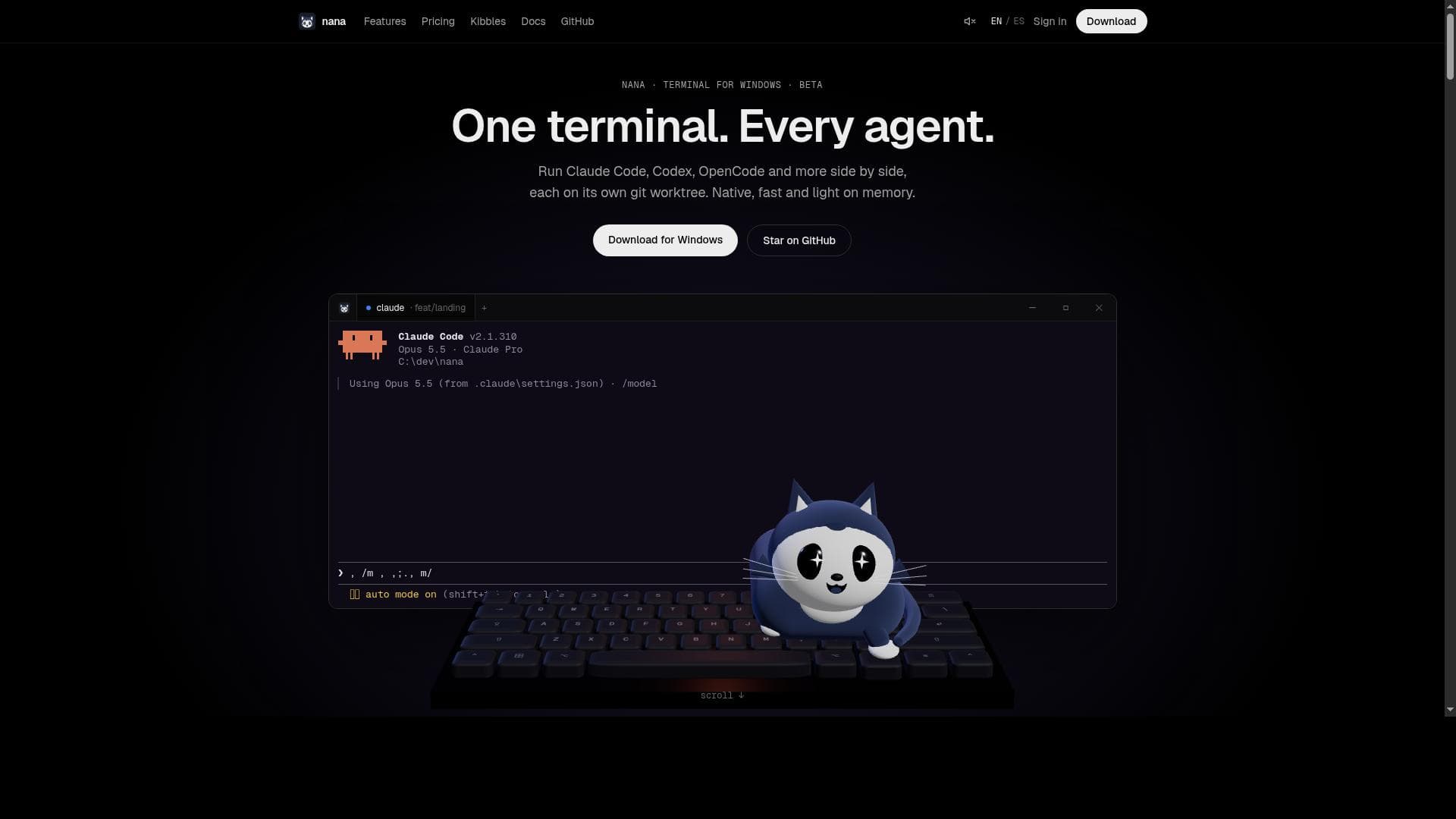
Nana is a fast, native Windows terminal that uniquely consolidates multiple coding agents by running each on its own git worktree within your favorite harness. Ideal for developers managing complex git workflows, nana boosts productivity by streamlining multi-agent environments into one efficient terminal.

Beschreibung
Nana is a native terminal multiplexer for Windows. Run Claude Code, Codex, OpenCode and more side by side, each on its own git worktree. See who is working, waiting or done, review diffs, and keep agents running after you close the app. Free beta.
Ausführliche Beschreibung
Nana is a cutting-edge native terminal application designed specifically for Windows 10 and Windows 11 users, aiming to streamline and enhance the workflow of developers who work with multiple coding agents. At its core, nana consolidates various coding agents into a single, efficient terminal environment, allowing each agent to run on its own dedicated git worktree. This unique approach enables developers to manage multiple projects or branches simultaneously without the overhead of switching contexts or opening multiple terminal windows. Nana integrates seamlessly with your preferred harness, providing a familiar and customizable interface that fits naturally into existing development setups. One of nana's standout features is its ability to run every coding agent on its own git worktree. This means that developers can isolate changes, test new features, or experiment with different codebases independently, all within the same terminal window. The integration with popular harnesses ensures that nana can be tailored to individual workflows, enhancing productivity by reducing friction and context switching. Furthermore, nana is a fast, native terminal optimized for Windows, offering performance and responsiveness that rival or exceed traditional terminals. Being open source, with releases available on GitHub, nana invites community contributions and transparency, fostering continuous improvement and trust. Nana is particularly well-suited for professional developers, software engineers, and teams who frequently juggle multiple coding agents or projects. It is ideal for those who rely heavily on git workflows and require a streamlined terminal experience that supports complex branching and version control scenarios. Use cases include managing feature branches, running automated coding agents for testing or deployment, and integrating AI-powered coding assistants within a unified terminal environment. By consolidating these tasks, nana helps reduce cognitive load and accelerates development cycles. Regarding pricing, nana is offered as a free tool under an open-source license, with no cost to users. This makes it accessible to individual developers, startups, and enterprises alike, without the barrier of subscription fees or licensing costs. Users can download the latest releases directly from the official GitHub repository, ensuring they have access to the most recent features and updates. When compared to alternative terminal applications, nana distinguishes itself through its native Windows optimization and its unique support for running multiple coding agents on separate git worktrees within a single terminal interface. While other terminals may offer multi-tab or pane support, nana’s git worktree integration and harness compatibility provide a more developer-centric approach to managing complex workflows. However, as a beta version, users might encounter some limitations or bugs, and the ecosystem around nana is still growing compared to more established terminal emulators. Additionally, its Windows-only focus means it is not suitable for developers working primarily on macOS or Linux systems. In summary, nana offers a powerful, efficient, and developer-friendly terminal solution tailored for Windows users who need to manage multiple coding agents and git worktrees seamlessly. Its open-source nature, combined with fast native performance and harness integration, makes it a compelling choice for developers seeking to optimize their terminal workflows. Potential users should consider their platform requirements and the current beta status when evaluating nana for production use.
Tool-Funktionen
- Run every coding agent on its own git worktree
- Integrates with your favorite harness
- Fast native terminal for Windows 10 and Windows 11
- Open source with releases available on GitHub
- Supports multiple coding agents in one terminal
Beschreibung
Nana is a fast, native Windows terminal that uniquely consolidates multiple coding agents by running each on its own git worktree within your favorite harness. Ideal for developers managing complex git workflows, nana boosts productivity by streamlining multi-agent environments into one efficient terminal.
Nana is a native terminal multiplexer for Windows. Run Claude Code, Codex, OpenCode and more side by side, each on its own git worktree. See who is working, waiting or done, review diffs, and keep agents running after you close the app. Free beta.
Ausführliche Beschreibung
Nana is a cutting-edge native terminal application designed specifically for Windows 10 and Windows 11 users, aiming to streamline and enhance the workflow of developers who work with multiple coding agents. At its core, nana consolidates various coding agents into a single, efficient terminal environment, allowing each agent to run on its own dedicated git worktree. This unique approach enables developers to manage multiple projects or branches simultaneously without the overhead of switching contexts or opening multiple terminal windows. Nana integrates seamlessly with your preferred harness, providing a familiar and customizable interface that fits naturally into existing development setups. One of nana's standout features is its ability to run every coding agent on its own git worktree. This means that developers can isolate changes, test new features, or experiment with different codebases independently, all within the same terminal window. The integration with popular harnesses ensures that nana can be tailored to individual workflows, enhancing productivity by reducing friction and context switching. Furthermore, nana is a fast, native terminal optimized for Windows, offering performance and responsiveness that rival or exceed traditional terminals. Being open source, with releases available on GitHub, nana invites community contributions and transparency, fostering continuous improvement and trust. Nana is particularly well-suited for professional developers, software engineers, and teams who frequently juggle multiple coding agents or projects. It is ideal for those who rely heavily on git workflows and require a streamlined terminal experience that supports complex branching and version control scenarios. Use cases include managing feature branches, running automated coding agents for testing or deployment, and integrating AI-powered coding assistants within a unified terminal environment. By consolidating these tasks, nana helps reduce cognitive load and accelerates development cycles. Regarding pricing, nana is offered as a free tool under an open-source license, with no cost to users. This makes it accessible to individual developers, startups, and enterprises alike, without the barrier of subscription fees or licensing costs. Users can download the latest releases directly from the official GitHub repository, ensuring they have access to the most recent features and updates. When compared to alternative terminal applications, nana distinguishes itself through its native Windows optimization and its unique support for running multiple coding agents on separate git worktrees within a single terminal interface. While other terminals may offer multi-tab or pane support, nana’s git worktree integration and harness compatibility provide a more developer-centric approach to managing complex workflows. However, as a beta version, users might encounter some limitations or bugs, and the ecosystem around nana is still growing compared to more established terminal emulators. Additionally, its Windows-only focus means it is not suitable for developers working primarily on macOS or Linux systems. In summary, nana offers a powerful, efficient, and developer-friendly terminal solution tailored for Windows users who need to manage multiple coding agents and git worktrees seamlessly. Its open-source nature, combined with fast native performance and harness integration, makes it a compelling choice for developers seeking to optimize their terminal workflows. Potential users should consider their platform requirements and the current beta status when evaluating nana for production use.
Häufig gestellte Fragen
What is nana?
Nana is a native terminal application for Windows 10 and Windows 11 that allows developers to run multiple coding agents simultaneously, each on its own git worktree, within a single terminal interface integrated with their preferred harness.
How much does nana cost?
Nana is completely free to use as it is an open-source project with releases available on GitHub.
Who is nana best for?
Nana is best suited for developers, software engineers, and teams who work with multiple coding agents and git branches, especially those who want to streamline their workflow on Windows platforms.
What are the main features of nana?
Key features include running every coding agent on its own git worktree, integration with popular harnesses, fast native performance on Windows 10 and 11, support for multiple agents in one terminal, and open-source availability.
Does nana offer a free trial?
Since nana is free and open source, there is no need for a trial period; users can download and use it immediately without cost.
What integrations does nana support?
Nana integrates with your favorite harness, allowing customization and compatibility with various development environments and workflows.
How does nana work?
Nana works by running each coding agent on its own git worktree within a single native terminal window, consolidating multiple agents and enabling efficient workflow management on Windows.
Social Media
Tool nutzenBewertungen
Noch keine Bewertungen. Teile als Erste:r deine Erfahrung.
Gesponserte Tools
































Empfohlene Tools
Bleib auf dem Laufenden zu den neuesten KI-Tools
Hol dir die neuesten Insights – abonniere unseren Newsletter
Gelesen und geschätzt von 50,000+ Leser:innen
Tritt der größten KI-Community bei
Unsere Community und unser Team sind für dich da!
Dein Feedback hilft Alice AI, in zukünftigen Versionen besser zu werden.