










Ist das dein KI-Tool? Beanspruche es noch heute.
Bestätige die Inhaberschaft, verwalte dein Profil und schalte Wachstumsfunktionen frei.
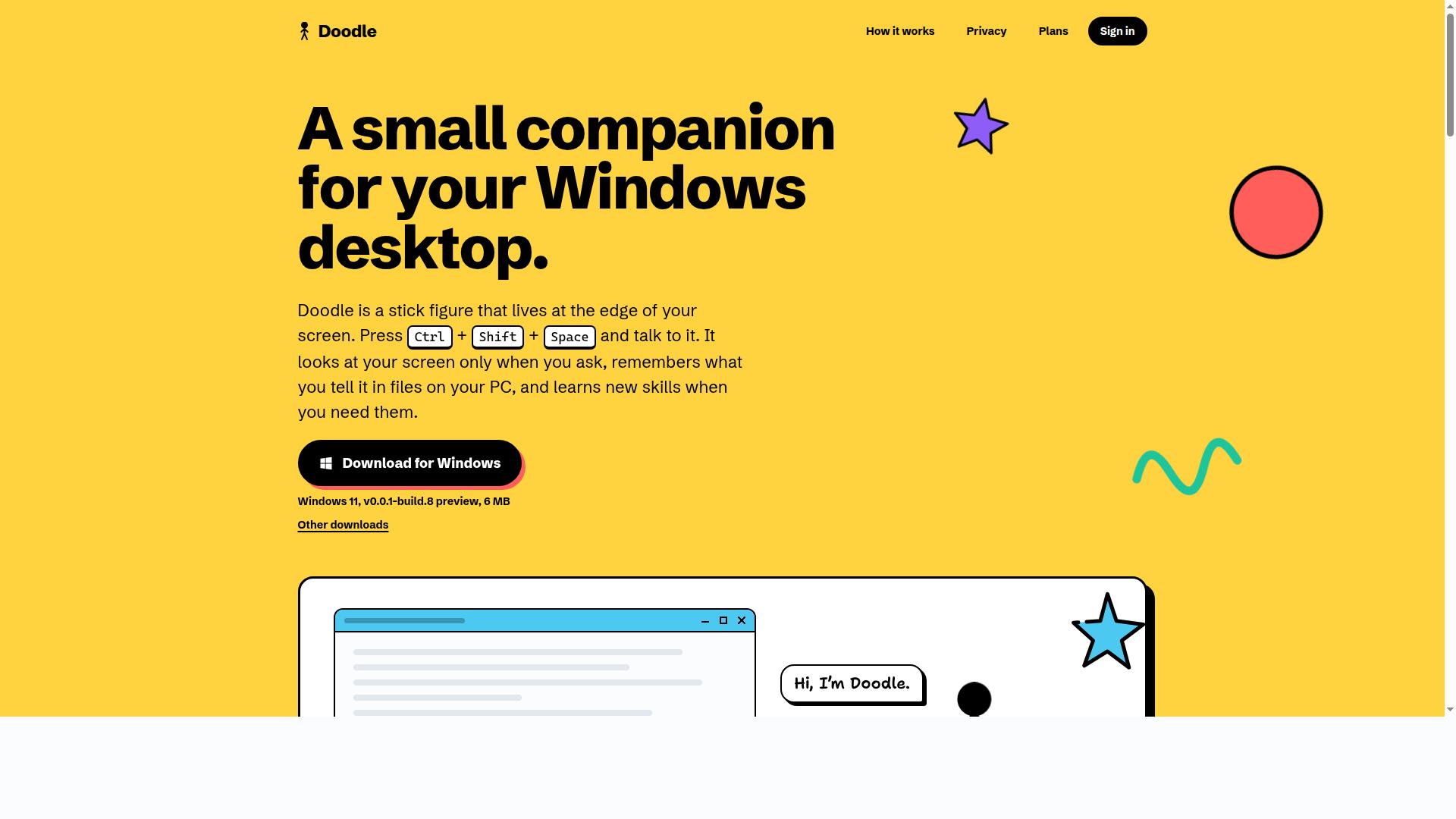
Doodle is a unique Windows desktop companion that lives as a stick figure on your screen, offering interactive note-taking and personalized assistance through simple voice prompts. Ideal for users seeking a friendly, unobtrusive assistant that remembers your notes and learns new skills with your approval.

Beschreibung
Doodle is a little AI companion that lives on your Windows taskbar. Ask it anything with Ctrl+Shift+Space, or dictate into any app. When it can't do something, Doodle Evolution builds a bespoke plugin, shows you what it can reach, and waits for your OK.
Ausführliche Beschreibung
Doodle is an innovative desktop companion designed specifically for Windows users who want a more interactive and personalized assistant experience directly on their desktop. Unlike traditional digital assistants that operate through voice commands or separate apps, Doodle manifests as a charming stick figure that resides at the edge of your screen, blending seamlessly into your workspace without being intrusive. Its core purpose is to provide a friendly, approachable interface that listens, remembers, and learns from your interactions, making your desktop environment more engaging and helpful. At its heart, Doodle is more than just a visual novelty. It activates when you press Ctrl + Shift + Space, allowing you to talk to it naturally. This interaction model makes it easy to prompt Doodle for assistance or to share information without interrupting your workflow. One of its standout capabilities is its ability to remember notes you tell it, which you can later review. This feature turns Doodle into a personal memory aid, helping you keep track of important details, reminders, or ideas without needing to open separate note-taking applications. Furthermore, Doodle can learn new skills, but only with your explicit approval, ensuring that its capabilities grow in a way that suits your needs and preferences. This learning aspect makes it a dynamic assistant that evolves alongside you. Doodle is ideal for individuals who spend a significant amount of time on their Windows desktop and appreciate a subtle yet interactive companion. This includes professionals who juggle multiple tasks and need a quick way to jot down notes or reminders, students who want a friendly assistant to help organize their study sessions, and casual users who enjoy a playful but useful desktop presence. Its unobtrusive design means it won’t distract from your work but will be ready to assist when called upon. Use cases range from managing to-do lists, capturing fleeting thoughts, to gradually expanding its functionality to suit specialized workflows. Regarding pricing, Doodle offers various plans tailored to different user needs, including a free tier that allows users to experience its core features without commitment. Paid plans unlock additional capabilities and customization options, making it suitable for power users who want a more robust and personalized assistant. The website provides clear information on subscription tiers and any trial periods available, enabling users to choose the best fit for their usage patterns. Compared to other desktop assistants or note-taking tools, Doodle stands out due to its unique stick figure interface and its focus on being a companion rather than just a tool. While many assistants rely heavily on voice recognition or complex commands, Doodle’s simple activation and memory features make it accessible and easy to use. Its ability to learn new skills with user consent also positions it as a more adaptive and personalized option compared to static assistants. However, it is currently limited to Windows desktops and may not integrate as deeply with other platforms or ecosystems as some competitors. Potential users should consider that Doodle’s stick figure interface, while charming and minimalistic, may not appeal to everyone’s aesthetic preferences. Additionally, as a relatively new tool, it might not yet support extensive third-party integrations or advanced AI capabilities found in more established assistants. Users looking for a highly sophisticated AI with broad ecosystem integration might find Doodle’s current feature set somewhat limited. Nonetheless, for those seeking a lightweight, interactive, and evolving desktop companion, Doodle offers a refreshing alternative that combines simplicity with personality.
Tool-Funktionen
- Lives at the edge of your screen as a stick figure
- Interacts with you when you press Ctrl + Shift + Space and talk
- Remembers what you tell it in notes you can read
- Learns new skills with your approval
Beschreibung
Doodle is a unique Windows desktop companion that lives as a stick figure on your screen, offering interactive note-taking and personalized assistance through simple voice prompts. Ideal for users seeking a friendly, unobtrusive assistant that remembers your notes and learns new skills with your approval.
Doodle is a little AI companion that lives on your Windows taskbar. Ask it anything with Ctrl+Shift+Space, or dictate into any app. When it can't do something, Doodle Evolution builds a bespoke plugin, shows you what it can reach, and waits for your OK.
Ausführliche Beschreibung
Doodle is an innovative desktop companion designed specifically for Windows users who want a more interactive and personalized assistant experience directly on their desktop. Unlike traditional digital assistants that operate through voice commands or separate apps, Doodle manifests as a charming stick figure that resides at the edge of your screen, blending seamlessly into your workspace without being intrusive. Its core purpose is to provide a friendly, approachable interface that listens, remembers, and learns from your interactions, making your desktop environment more engaging and helpful. At its heart, Doodle is more than just a visual novelty. It activates when you press Ctrl + Shift + Space, allowing you to talk to it naturally. This interaction model makes it easy to prompt Doodle for assistance or to share information without interrupting your workflow. One of its standout capabilities is its ability to remember notes you tell it, which you can later review. This feature turns Doodle into a personal memory aid, helping you keep track of important details, reminders, or ideas without needing to open separate note-taking applications. Furthermore, Doodle can learn new skills, but only with your explicit approval, ensuring that its capabilities grow in a way that suits your needs and preferences. This learning aspect makes it a dynamic assistant that evolves alongside you. Doodle is ideal for individuals who spend a significant amount of time on their Windows desktop and appreciate a subtle yet interactive companion. This includes professionals who juggle multiple tasks and need a quick way to jot down notes or reminders, students who want a friendly assistant to help organize their study sessions, and casual users who enjoy a playful but useful desktop presence. Its unobtrusive design means it won’t distract from your work but will be ready to assist when called upon. Use cases range from managing to-do lists, capturing fleeting thoughts, to gradually expanding its functionality to suit specialized workflows. Regarding pricing, Doodle offers various plans tailored to different user needs, including a free tier that allows users to experience its core features without commitment. Paid plans unlock additional capabilities and customization options, making it suitable for power users who want a more robust and personalized assistant. The website provides clear information on subscription tiers and any trial periods available, enabling users to choose the best fit for their usage patterns. Compared to other desktop assistants or note-taking tools, Doodle stands out due to its unique stick figure interface and its focus on being a companion rather than just a tool. While many assistants rely heavily on voice recognition or complex commands, Doodle’s simple activation and memory features make it accessible and easy to use. Its ability to learn new skills with user consent also positions it as a more adaptive and personalized option compared to static assistants. However, it is currently limited to Windows desktops and may not integrate as deeply with other platforms or ecosystems as some competitors. Potential users should consider that Doodle’s stick figure interface, while charming and minimalistic, may not appeal to everyone’s aesthetic preferences. Additionally, as a relatively new tool, it might not yet support extensive third-party integrations or advanced AI capabilities found in more established assistants. Users looking for a highly sophisticated AI with broad ecosystem integration might find Doodle’s current feature set somewhat limited. Nonetheless, for those seeking a lightweight, interactive, and evolving desktop companion, Doodle offers a refreshing alternative that combines simplicity with personality.
Häufig gestellte Fragen
What is Doodle?
Doodle is a small, interactive companion for Windows desktops represented as a stick figure that lives at the edge of your screen. It interacts with you when prompted, remembers notes you tell it, and learns new skills with your approval, providing a personalized desktop assistant experience.
How much does Doodle cost?
Doodle offers multiple pricing plans, including a free tier with basic features and paid subscriptions that unlock additional capabilities and customization options. Detailed pricing information is available on their website.
Who is Doodle best for?
Doodle is best suited for Windows users who want a subtle, interactive desktop assistant to help with note-taking, reminders, and personalized assistance. It is ideal for professionals, students, and casual users who appreciate a friendly companion on their desktop.
What are the main features of Doodle?
Key features include a stick figure that lives at the edge of your screen, activation via Ctrl + Shift + Space for voice interaction, the ability to remember and display notes you tell it, and the capability to learn new skills with your approval.
Does Doodle offer a free trial?
Yes, Doodle provides a free tier that allows users to experience its core features. Additional paid plans may offer trial periods or demos; details can be found on their website.
What integrations does Doodle support?
Currently, Doodle focuses on being a standalone Windows desktop companion. It does not emphasize third-party integrations but learns new skills with user consent, which may expand its capabilities over time.
How does Doodle work?
Doodle resides as a stick figure at the edge of your Windows desktop and activates when you press Ctrl + Shift + Space. You can talk to it to leave notes or request assistance. It remembers your notes for later review and can learn new skills when you approve them, making it a personalized and interactive assistant.
Social Media

Bewertungen
Noch keine Bewertungen. Teile als Erste:r deine Erfahrung.
Gesponserte Tools


































Empfohlene Tools
Bleib auf dem Laufenden zu den neuesten KI-Tools
Hol dir die neuesten Insights – abonniere unseren Newsletter
Gelesen und geschätzt von 50,000+ Leser:innen
Tritt der größten KI-Community bei
Unsere Community und unser Team sind für dich da!
Dein Feedback hilft Alice AI, in zukünftigen Versionen besser zu werden.





 , Ein Produkt von